


Participant
February 20, 2025
Answered

HOW TO FIND OBJECT IN LAYER WTI THE FASTEST WAY?!
  • February 20, 2025
  • 3 replies
  • 216 views

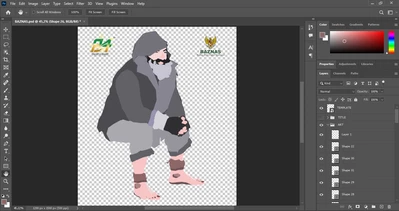
i want to ask, i tryna make this type of design but its hard to search the layers, example im going to delete the mouth idk where is that in layer panel, can u give me the fastest way to find it?

Correct answer Bojan Živković11378569

With the move tool active, enable Auto Select > Layer in the Options bar, then click on the part you wish to select in the layers panel.

3 replies

Bojan Živković11378569
Community Expert
Community Expert
February 20, 2025

With the move tool active, enable Auto Select > Layer in the Options bar, then click on the part you wish to select in the layers panel.

Stephen Marsh
Community Expert
Community Expert
February 20, 2025

With the moVe tool active and on the visible pixels of the mouth, contextual right-click and choose a layer from the menu list.


Consider ticking the move tool options for "auto-select" and/or "show transform controls".


Also consider naming your layers with unique and unambiguous names, the small amount of time and effort that this takes will pay for itself in the long run.

Participant
February 20, 2025