December 13, 2025
Answered

how to get rid of photoshop 2026 home screen?

  • December 13, 2025
  • 2 replies
  • 832 views

how do I get rid of photoshop 2026 home screen?


Correct answer Conrad_C

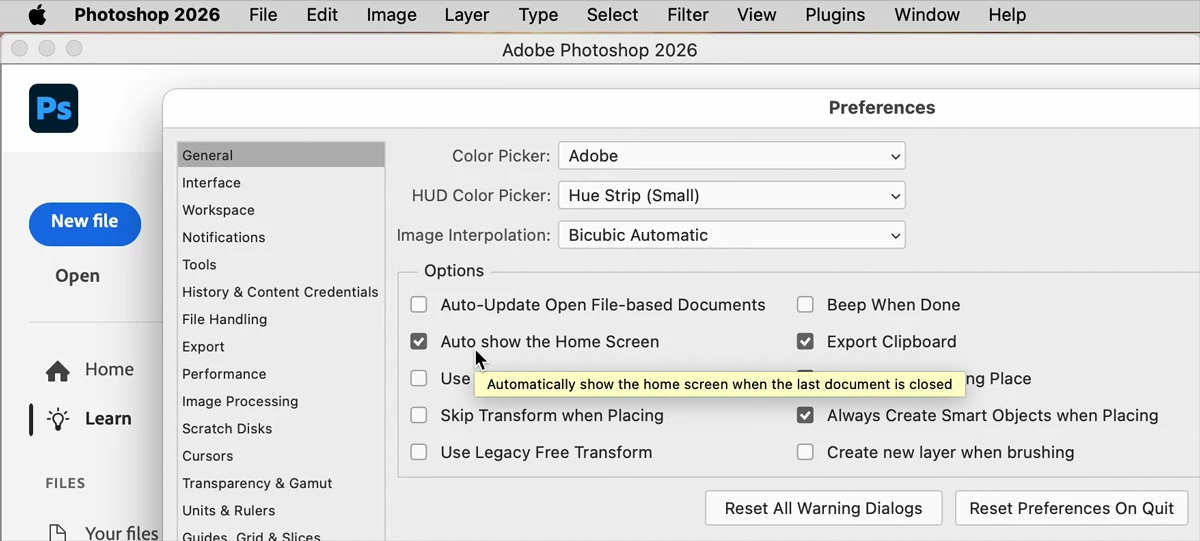
D Fosse correctly answered just before I posted this, so I’ll just add the picture I was making of the setting that you should disable:


Photoshop-Preferences-Auto-Show-Home-Screen.jpg

2 replies

Conrad_C
Community Expert
Conrad_CCommunity ExpertCorrect answer
Community Expert
December 13, 2025

D Fosse correctly answered just before I posted this, so I’ll just add the picture I was making of the setting that you should disable:


Photoshop-Preferences-Auto-Show-Home-Screen.jpg

D Fosse
Community Expert
Community Expert
December 13, 2025

Yes, that's it.


Ideally, it should be enough to just uncheck the box, but I know from experience that you may also need to close the application in the standard interface, for it to stick.

D Fosse
Community Expert
Community Expert
December 13, 2025

1. Uncheck "auto show home screen" in Preferences > general.

2. Open an image so the home screen is replaced with the standard workspace.

3. Close the image. Now you only have the standard Photoshop UI.

4. Close Photoshop.


Next time it opens, you should only get the standard UI.

December 13, 2025

thanks for reply but my problem is that I dont get that dropdown in GENERAL ! So I don't have the next thing to click and feel totally stuck!