
Inspiring
January 29, 2025
質問

How to get rid of the shortcut for "First Brush"?

  • January 29, 2025
  • 返信数 3.
  • 733 ビュー

I'm using a German keyboard layout, and the key to the right of the left SHIFT key (which is \ on US keyboards I believe, it's < on German ones) is assigned to the function "first brush". I took a look at the keyboard shortcuts, and there is nothing assigned to "first brush", yet whenever I hit this key, the first brush is selected. How can I get rid of this shortcut completely? It keeps messing my workflow since I occasionaly hit it by accident while painting, and it changes my currently used brush.


Photoshop 26.3.0 on Windows 10.


返信数 3

D Fosse
Community Expert
Community Expert
January 30, 2025

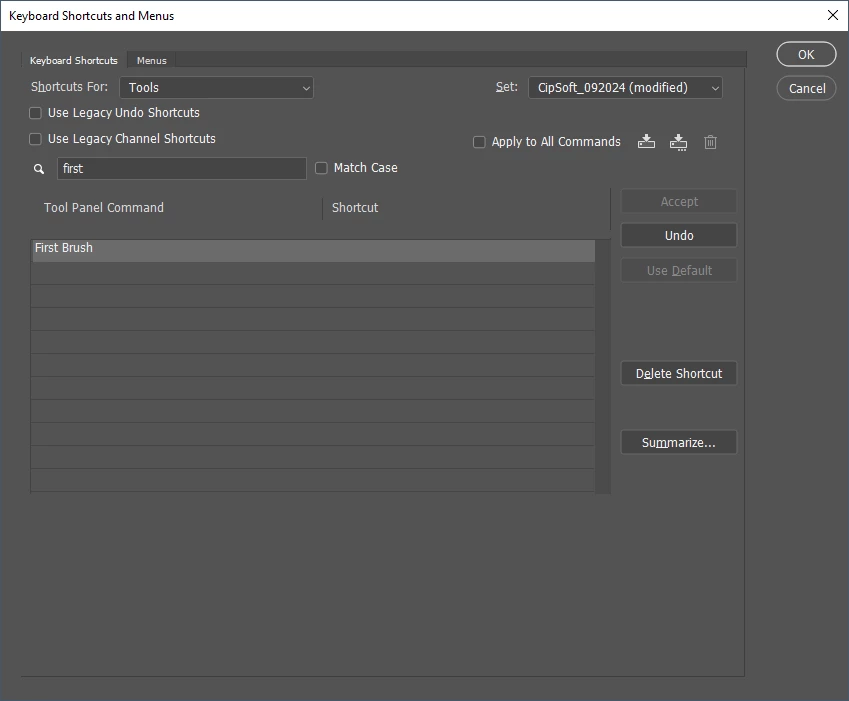
Actually, "First Brush" does have a customizable shortcut. The default is the < key.


It's under Tools in the shortcuts dialog:

Hannes Drexl作成者
Inspiring
February 3, 2025

Yes, as I mentioned, I did delete the key for this shortcut, yet when pressing <, it still works. I can't get rid of it. Assigning a different key doesn't help either. I also reverted to Photoshop defaults and tried removing the key, that doesn't help either.

D Fosse
Community Expert
Community Expert
February 3, 2025

That sounds like corrupt preferences. Try to reset.


Remember to save out anything you need first (actions/brushes/etc)

Bojan Živković11378569
Community Expert
Community Expert
January 30, 2025

I believe that Shift + . (dot) serves as a keyboard shortcut for the first brush. There are several shortcuts that lack corresponding menu items, and they cannot be modified, such as stamp layers (all modifiers + E). This one might belong to that category.

creative explorer
Community Expert
Community Expert
January 30, 2025

@Bojan Živković11378569 I don't have that brush on my end at all! And the set is different too.... not the standard Photoshop ones


m
creative explorer
Community Expert
Community Expert
January 29, 2025

@Hannes Drexl did you try this.... in your toolbar, there are three ...


Click and hold on those three dots until a bigger pop-up box opens

So, in my case, I never used the Pattern Clone Stamp Tool, so I will remove this from my toolbar and move to the other side. Click and hold and drag it over


Now before I could have use the keyboard shortcuts to get that tool, and now moving it over a little to the extra tools, the keyboard shortcut isn't active on my end. I could even try holding the 'Shift' S to try to cycle to get it, yet, that doesn't work for me. 

m
Hannes Drexl作成者
Inspiring
January 29, 2025

@creative explorer Thanks for the tip, but "first brush" is not really a tool that's exposed to the toolbar, so it doesn't show up in this list. I do have tools hidden this way, but I still need them occasionally, so I don't have the shortcuts for them disabled.

creative explorer
Community Expert
Community Expert
January 30, 2025

@Hannes Drexl then just change the keyboard shortcut to a different key then?


m