Known Participant
January 18, 2024
解決済み

How to get text (word) for a unwanted font in Photoshop Script

  • January 18, 2024
  • 返信数 2.
  • 653 ビュー

Hi,

I'm working with scripts that get unwanted font text in PSDs. In some cases, there are text items with more than one font, so how to get a specific word?


My Expect Output:  unwanted font: "Font Name"   text: "tempor" 


このトピックへの返信は締め切られました。
解決に役立った回答 c.pfaffenbichler

So modify the Script. 

You can check for the specific font-name with an if-clause within the for-clause (edited) and use the »from« and »to«-values to determine the affected letters. 


Edit: 
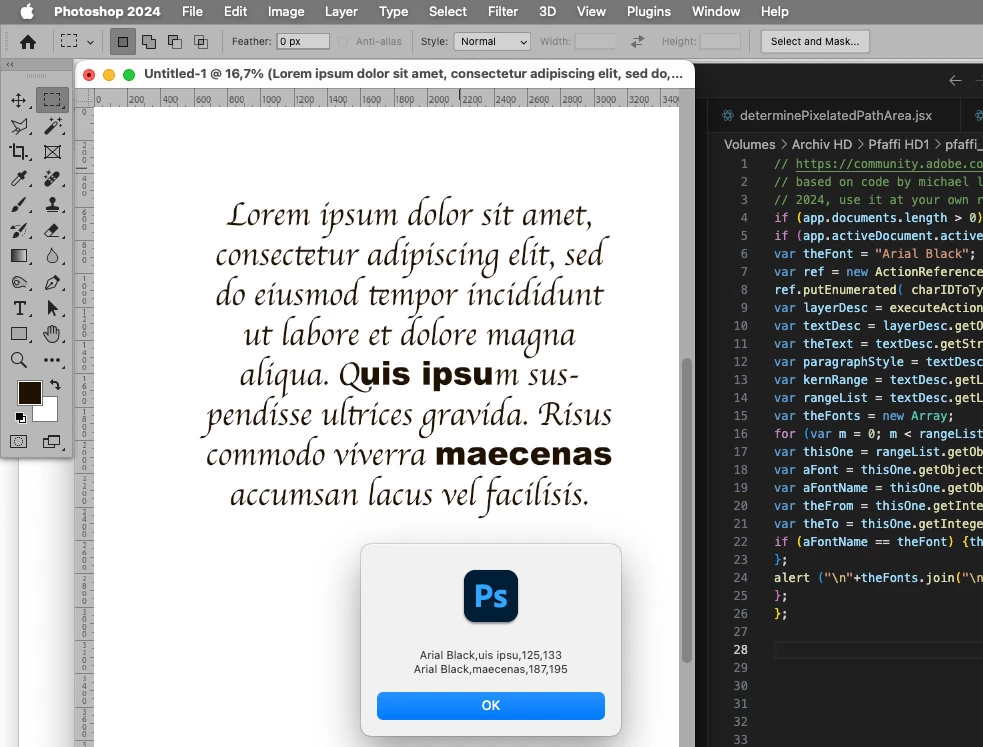
// based on code by michael l hale;
// get letters with specific fonts from selected type layer;
// 2024, use it at your own risk;
if (app.documents.length > 0) {
if (app.activeDocument.activeLayer.kind == LayerKind.TEXT) {
var theFont = "Arial Black";
var ref = new ActionReference();
ref.putEnumerated( charIDToTypeID("Lyr "), charIDToTypeID("Ordn"), charIDToTypeID("Trgt") ); 
var layerDesc = executeActionGet(ref);
var textDesc = layerDesc.getObjectValue(stringIDToTypeID('textKey'));
var theText = textDesc.getString(stringIDToTypeID('textKey'));
var paragraphStyle = textDesc.getList(stringIDToTypeID('paragraphStyleRange'));
var kernRange = textDesc.getList(stringIDToTypeID('kerningRange'));
var rangeList = textDesc.getList(stringIDToTypeID('textStyleRange'));
var theFonts = new Array;
for (var m = 0; m < rangeList.count; m++) {
var thisOne = rangeList.getObjectValue(m);
var aFont = thisOne.getObjectValue(stringIDToTypeID('textStyle')).getString(stringIDToTypeID('fontPostScriptName'));
var aFontName = thisOne.getObjectValue(stringIDToTypeID('textStyle')).getString(stringIDToTypeID('fontName'));
var theFrom = thisOne.getInteger(stringIDToTypeID('from'));
var theTo = thisOne.getInteger(stringIDToTypeID('to'));
if (aFontName == theFont) {theFonts.push([aFontName, theText.slice(theFrom, theTo), theFrom, theTo]);}
};
alert ("\n"+theFonts.join("\n"));
};
};


返信数 2

c.pfaffenbichler
Community Expert
Community Expert
January 19, 2024


// based on code by michael l hale;
// 2023, use it at your own risk;
if (app.documents.length > 0) {
if (app.activeDocument.activeLayer.kind == LayerKind.TEXT) {
var ref = new ActionReference();
ref.putEnumerated( charIDToTypeID("Lyr "), charIDToTypeID("Ordn"), charIDToTypeID("Trgt") ); 
var layerDesc = executeActionGet(ref);
var textDesc = layerDesc.getObjectValue(stringIDToTypeID('textKey'));
var paragraphStyle = textDesc.getList(stringIDToTypeID('paragraphStyleRange'));
var kernRange = textDesc.getList(stringIDToTypeID('kerningRange'));
var rangeList = textDesc.getList(stringIDToTypeID('textStyleRange'));
var theFonts = new Array;
for (var m = 0; m < rangeList.count; m++) {
var thisOne = rangeList.getObjectValue(m);
var aFont = thisOne.getObjectValue(stringIDToTypeID('textStyle')).getString(stringIDToTypeID('fontPostScriptName'));
var theFrom = thisOne.getInteger(stringIDToTypeID('from'));
var theTo = thisOne.getInteger(stringIDToTypeID('to'));
theFonts.push([aFont, theFrom, theTo]);
};
alert ("\n"+theFonts.join("\n"));
};
};

 

New Beginner1作成者
Known Participant
January 19, 2024

Super, thank you

But I need any one font text.

Please provide the script for the "KoHo-Regular" font match text (content)


jane-e
Community Expert
Community Expert
January 19, 2024
quote

Please provide the script for the "KoHo-Regular" font match text (content)

By @New Beginner1


Scripts aren't "provided" unless indicated. They are written by our volunteer scripters.


Jane

Legend
January 18, 2024

How do you determine which font is "unwanted"? There is not a way in the DOM to do this, you'd need Action Manager code.

New Beginner1作成者
Known Participant
January 19, 2024

Font Name:  "Myriad Pro"


How to get text (word) for a specific font ("Myriad Pro"). in Photoshop scripts