
Inspiring
Aug 29, 2024 7:33 AM UTC
Question

How to get the bounds of the exported png

I use a script to export a layer as a png. This png does not contain transparent areas.  how can I get the bounds of the png relative to the canvas.


function quickExportPng() {
 
    var d = new ActionDescriptor();

    var r = new ActionReference();

    r.putEnumerated(stringIDToTypeID("layer"), stringIDToTypeID("ordinal"), stringIDToTypeID("targetEnum"));

    d.putReference(stringIDToTypeID("null"), r);

    d.putString(stringIDToTypeID("fileType"), "png");

    d.putInteger(stringIDToTypeID("quality"), 32);

    d.putInteger(stringIDToTypeID("metadata"), 0);

    d.putString(stringIDToTypeID("destFolder"), exportDir);

    d.putBoolean(stringIDToTypeID("sRGB"), true);

    d.putBoolean(stringIDToTypeID("openWindow"), false);

    executeAction(stringIDToTypeID("exportSelectionAsFileTypePressed"), d, DialogModes.NO);

}


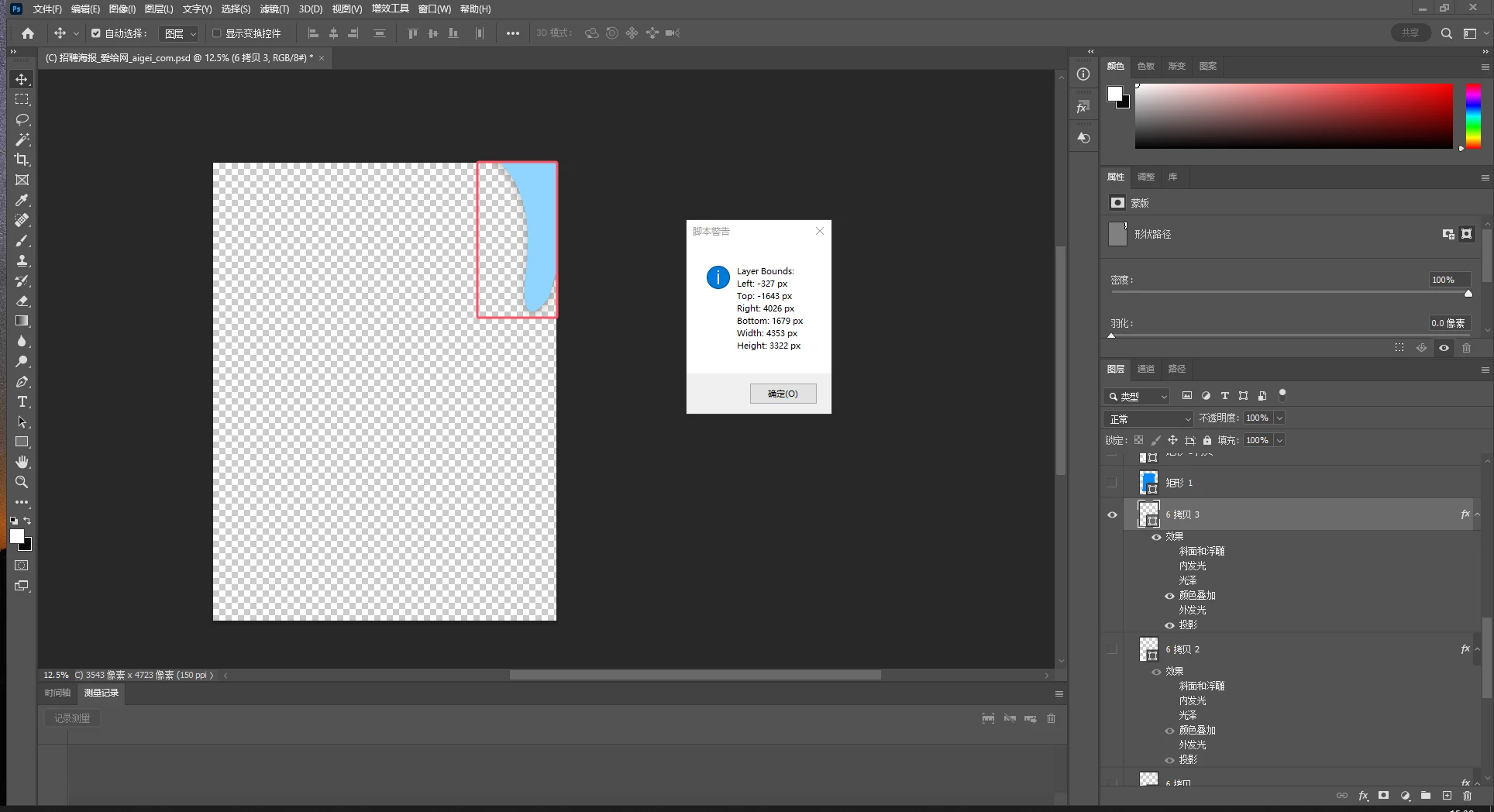
 The red rectangle is the exported png content,The popup box is the bounds of the layer.
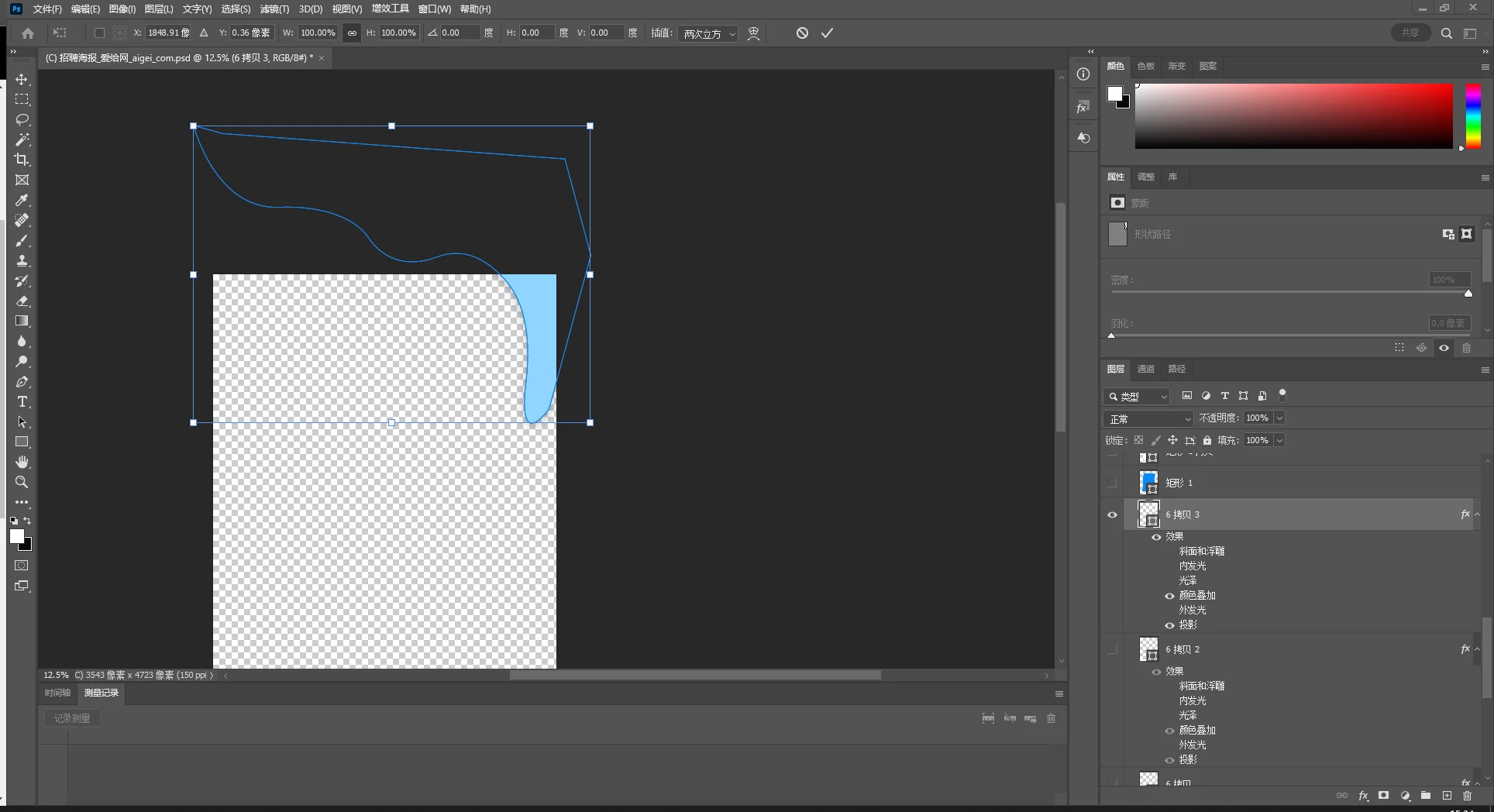
 Press ctrl+T on this layer to display the actual content and position of this layer.
This topic is closed to new replies. Start a new post to keep the conversation going.

14 replies

c.pfaffenbichler
Community Expert
Community Expert
Aug 31, 2024 12:24 PM UTC

A possible work-around: 

// 2024, use it at your own risk;
if (app.documents.length > 0) {
var doc = app.activeDocument;
if (doc.activeLayer != null) {
var originalRulerUnits = app.preferences.rulerUnits;
app.preferences.rulerUnits = Units.PIXELS;
var theDup = doc.duplicate ("copy", true);
hideOthers();
var bounds = theDup.activeLayer.bounds;
//var bounds = layer.bounds;
var left = bounds[0].as('px');
var top = bounds[1].as('px');
var right = bounds[2].as('px');
var bottom = bounds[3].as('px');
var width = right - left;
var height = bottom - top;
theDup.close(SaveOptions.DONOTSAVECHANGES);
alert("Layer Bounds:\n" +
"Left: " + left + " px\n" +
"Top: " + top + " px\n" +
"Right: " + right + " px\n" +
"Bottom: " + bottom + " px\n" +
"Width: " + width + " px\n" +
"Height: " + height + " px");
app.preferences.rulerUnits = originalRulerUnits;
} else {
alert("No active layer selected.");
}
} else {
alert("No document open.");
};
////// toggle visibility of others //////
function hideOthers () {
var desc10 = new ActionDescriptor();
var list4 = new ActionList();
var ref7 = new ActionReference();
ref7.putEnumerated( charIDToTypeID( "Lyr " ), charIDToTypeID( "Ordn" ), charIDToTypeID( "Trgt" ) );
list4.putReference( ref7 );
desc10.putList( charIDToTypeID( "null" ), list4 );
desc10.putBoolean( charIDToTypeID( "TglO" ), true );
executeAction( charIDToTypeID( "Shw " ), desc10, DialogModes.NO );
};
Translate
Stephen Marsh
Community Expert
Community Expert
Aug 29, 2024 11:02 AM UTC

@javaer – If I am understanding your post (it's not exactly clear to me)...


1) Load layer transparency channel as a selection

2) Select > Inverse selection

3) Select > Inverse selection

4) Get selection bounds/co-ordinates

5) Deselect


Do you also need the bounds of the layer effects/style, such as drop shadow? That would take more work in ExtendScript. I believe that UXP has made advancements in this area though. Perhaps something like:


1) Dupe layer

2) Rasterize layer style

3) Load layer transparency channel as a selection

4) Select > Inverse selection

5) Select > Inverse selection

6) Get selection bounds/co-ordinates

7) Delete the temp layer

😎 Deselect

Translate
javaerAuthor
Inspiring
Aug 30, 2024 1:32 AM UTC

This is too complicated. Is there no way to get the bounds in the "Quick Export Png" operation?

Translate
javaerAuthor
Inspiring
Aug 30, 2024 1:33 AM UTC

And the way you suggest it now, the shadow part is not included.

Translate
c.pfaffenbichler
Community Expert
Community Expert
Aug 29, 2024 9:01 AM UTC

Please post the Script in question, the one you use to get the alert of the Bounds. 


Replacing negative values with 0 or values larger than the width/height with those would not be sufficient, so intersecting the transparency with the canvas would seem like an option. 

Translate
javaerAuthor
Inspiring
Aug 29, 2024 9:10 AM UTC

The script I posted is just a script for quickly exporting PNG. I don’t have a script that solves the problem.

Translate
c.pfaffenbichler
Community Expert
Community Expert
Aug 29, 2024 9:13 AM UTC

What problem? 

The png gets exported correctly, right? 

Translate