Participant
Jun 10, 2025 4:05 PM UTC
Answered

How to Hard Fill a selection?

Below is an example of how my selection fill works. Instead of doing a hard black fill, it does a gradient of black to white up to the selection. How do I make it fully black, and stop at the selection?




Bojan Živković11378569
Community Expert
Jun 10, 2025 5:28 PM UTC

Sorry, that was confusing verbiage.

I created a Fixed Selection that was 100 pixels less than the canvas.
Canvas: 3300 X 2550 ----> Fixed Selection: 3200 X 2450

I centered the selection, and then Select > Inverse. That created the border that I wanted. I then used the Fill to get the black border.


Have you tried this method to create a border inside?


  • Create a new blank layer, just in case. Make sure that layer is selected in the Layers panel.
  • Select > All
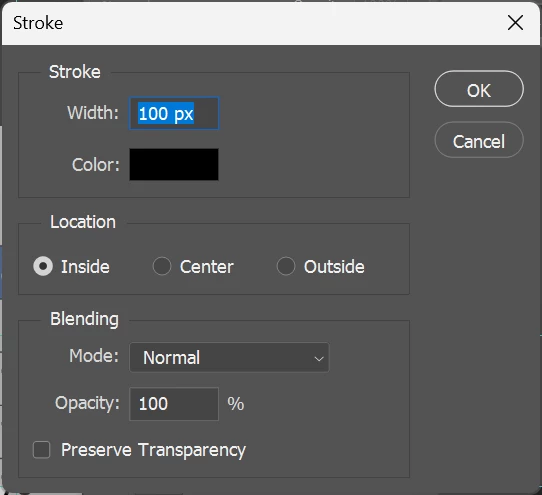
  • Edit > Stroke, set it to Inside (in this case), 100% Opacity, enter the number of pixels in Width text field, and choose a color.


6 replies

davescm
Community Expert
Community Expert
Jun 10, 2025 4:38 PM UTC

Check whether your selection is inverted (which would explain the fill outside rather than inside a selection) and also check the feather settings (which would explain the gradient rather than hard edge)

Dave

Translate
Bojan Živković11378569
Community Expert
Community Expert
Jun 10, 2025 4:25 PM UTC

Can you explain the process and the steps to reproduce or understand what is happening? A screenshot of the entire window with the Layers panel expanded and visible would also be helpful.


Translate
Participant
Jun 10, 2025 5:15 PM UTC

Thank you for your response. I was just now able to resolve the issue myself.

I was using Select > Modify > Border to create the border. When that option was selected, the gradient was added instead of the hard fill.

I resolved the issue by creating a fixed selection that was the size of the border I was wanting (100 pixels). Then I inversed the selection to create a border. Then, I filled it. There was no more gradient.

Translate
Participant
Jun 10, 2025 5:19 PM UTC

Sorry, that was confusing verbiage.

I created a Fixed Selection that was 100 pixels less than the canvas.
Canvas: 3300 X 2550 ----> Fixed Selection: 3200 X 2450

I centered the selection, and then Select > Inverse. That created the border that I wanted. I then used the Fill to get the black border.

Translate