
Participating Frequently
October 2, 2024
Question

How to ID colors from a fill layer

  • October 2, 2024
  • 2 replies
  • 417 views

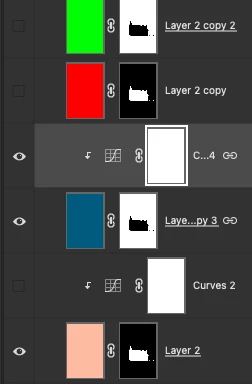
I'm sure there (should be) is a very simple solution here! Working on a project where I fill an entire layer, as you can see by the screengrab. Instead of having a million layers, I am changing the colors as I go. 

I need to ID colors, hex #'s, that I select to fill these layers to write them down. How do I go about that?


Thanks!
 

This topic has been closed for replies.

2 replies

davescm
Community Expert
Community Expert
October 2, 2024

Rather than filling a normal layer, use a solid colour fill layer. That way, you can just double click the fill layer in the layers panel which will open the colour picker so you can read the values.

In the meantime though, you can Alt click (option click on Mac) on the visibility icon (eye symbol) and it will show that layer in isolation which you can read with the eyedropper. Alt click again will turn the other layers back on.


Remember though, RGB values (or Hex codes which are just RGB values in base 16) are only relevant when stated with reference to a colour space. The same values will show different colours in different colour spaces (e.g. sRGB, Adobe RGB, ProPhoto etc)


Dave

Stephen Marsh
Community Expert
Community Expert
October 3, 2024

I seem to recall a script to convert raster layers to solid fill layers of the same fill colour... I'll have a look in my archives.


I couldn't find the script, I think that I was confusing another script for a shape layer to a fill layer...


Anyway, it turns out that this is pretty easy to do with a conditional action to gracefully handle masked or unmasked source layers, so all is good!


https://www.dropbox.com/scl/fi/ol50tm0q5fr76qozm4u6z/Raster-Layer-to-Solid-Fill.atn?rlkey=9e53by5dxzmnfgmtgm2nayzt8&st=oyef0lui&dl=0


Some scripts can run an action on all layers, or only selected layers:


//Jazz-y
// Run currently selected action on selected layers.jsx

#target photoshop
var s2t = stringIDToTypeID;


(r = new ActionReference()).putProperty(s2t('property'), p = s2t('targetLayersIDs'));
r.putEnumerated(s2t('document'), s2t('ordinal'), s2t('targetEnum'));
var lrs = executeActionGet(r).getList(p);

(r = new ActionReference()).putEnumerated(s2t('action'), s2t('ordinal'), s2t('targetEnum'));
try {
    try {
        var atn = executeActionGet(r).getString(s2t('name')),
            set = executeActionGet(r).getString(s2t('parentName'));
    }
    catch (e) { throw 'Before start select any action from actions palette!' }

    for (var i = 0; i < lrs.count; i++) {
        (r = new ActionReference()).putIdentifier(s2t('layer'), lrs.getReference(i).getIdentifier(s2t('layerID')));
        (d = new ActionDescriptor()).putReference(s2t('target'), r);
        //d.putBoolean(s2t("makeVisible"), false);
        try { executeAction(s2t('select'), d, DialogModes.NO); } catch (e) { throw e + '\nCannot select layer!' }
        (r = new ActionReference()).putName(s2t('action'), atn);
        r.putName(s2t('actionSet'), set);
        (d = new ActionDescriptor()).putReference(s2t('target'), r);
        try { executeAction(s2t('play'), d) } catch (e) { throw e + '\nCannot play action "' + atn + '" from set "' + set + '"' }
    }
} catch (e) { alert(e) }


https://prepression.blogspot.com/2017/11/downloading-and-installing-adobe-scripts.html


Participating Frequently
October 3, 2024

Thanks Stephen, I'll try this out.


Participating Frequently
October 2, 2024

I will add, that as I change colors from each layer, the most recent layer's color is the one that shows up in the fill color palette. So I am unable to go back to another/different layer to see what the hex # is.