
LosFX
Participant
April 16, 2019
Answered

How to include commas in a Data Set - Photoshop

  • April 16, 2019
  • 2 replies
  • 3810 views

I am successfully using the Data Set to import a csv or tab document and generate the sequence of items in my list. I managed to use the double quotes to get them around my quote text.   "It works!" she said

BUT

there are missing commas as part of the text in my text quotes.

If I use the CSV and I include the extra comma (whether commenting it first or not with regular expression  \,   ) it fails to import.

If I import the tab-delimited txt, the commas do not show up at all.

HOW do I include commas in the values of my Data Sets?
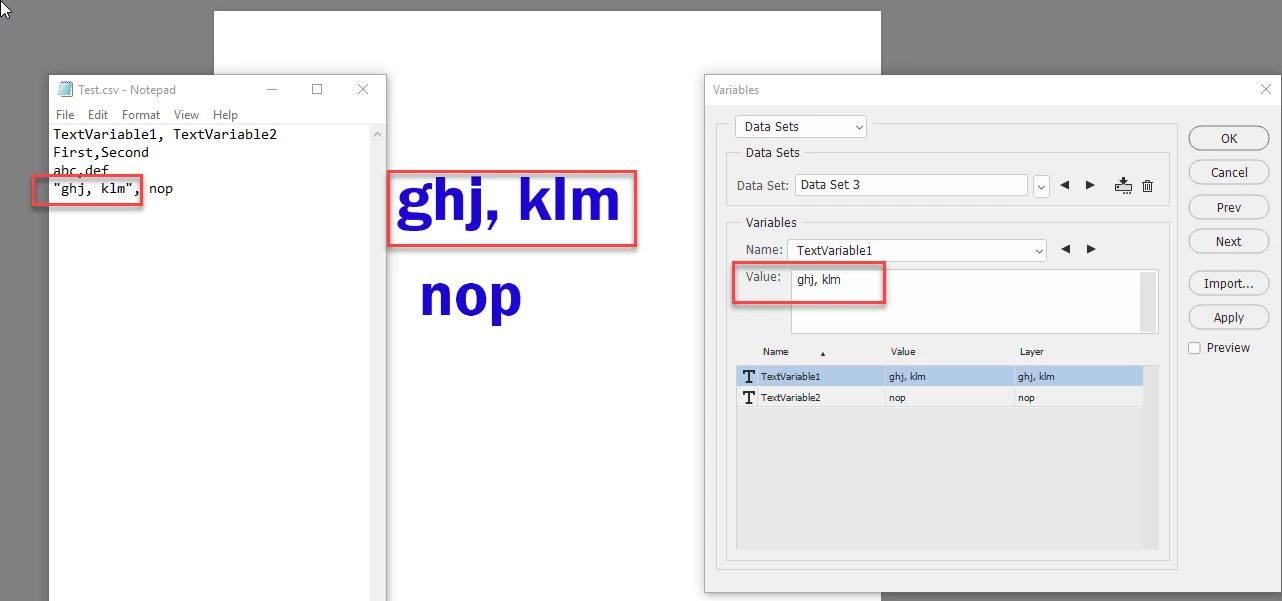
This topic has been closed for replies.
Correct answer davescm

Hi

Put the text with commas in quotes. See below:

Dave

2 replies

Cobra Kai
Participating Frequently
November 22, 2021

I just output the spreadsheet as tab delimited. 

davescm
Community Expert
davescmCommunity ExpertCorrect answer
Community Expert
April 16, 2019

Hi

Put the text with commas in quotes. See below:

Dave

davescm
Community Expert
Community Expert
April 17, 2019

I should have added that if you want the text in quotes then you need to double quote but for some reason Photoshop will only parse it to give the leading quote with a space after the first (if you miss the space out the lading quote is missed.

Dave

Stephen Marsh
Community Expert
Community Expert
April 17, 2019

I agree with Dave, here is a blogpost that I wrote about when I stumbled over this myself with a leading double-quote mark:

Prepression: Photoshop – Variables & Leading Double Quote Marks

If a Variable Data Set in Photoshop begins with a double-quote mark, such as:

“Totally Enclosed”

The opening double quote “ will be missing on the merged text in Photoshop:

Totally Enclosed”

To overcome this issue, the Data Set should use two double quote marks ““ – followed by the content and then closing with a single ” double quote mark.

““Totally Enclosed”

And then the text layer variable behaves as expected:

“Totally Enclosed”