Depending on the dimensions you need, there does not appear to be any problem with actual quality, it’s just that the ppi resolution is set wrong. If set correctly, there are enough pixels for a document 10 inches long at 300 ppi.
The Image > Image Size command says it is 3000 x 2000 pixels. If set to 72 ppi, that equals 41.667 inches by 27.778 inches.
This is because 3000 pixels / 72 pixels per inch = 41.667 inches.
As shown in the demo below, if all you do is disable Resample and set ppi to 300, it becomes 10 inches by 6.667 inches at 300 ppi. It’s still 3000 x 2000 pixels because it was not resampled, so no quality was lost, the only change is that the pixel density was increased so the physical dimensions (inches) had to decrease, but are now closer to dimensions you’d actually use. (Unless you actually needed a 41.667 inch long image.)
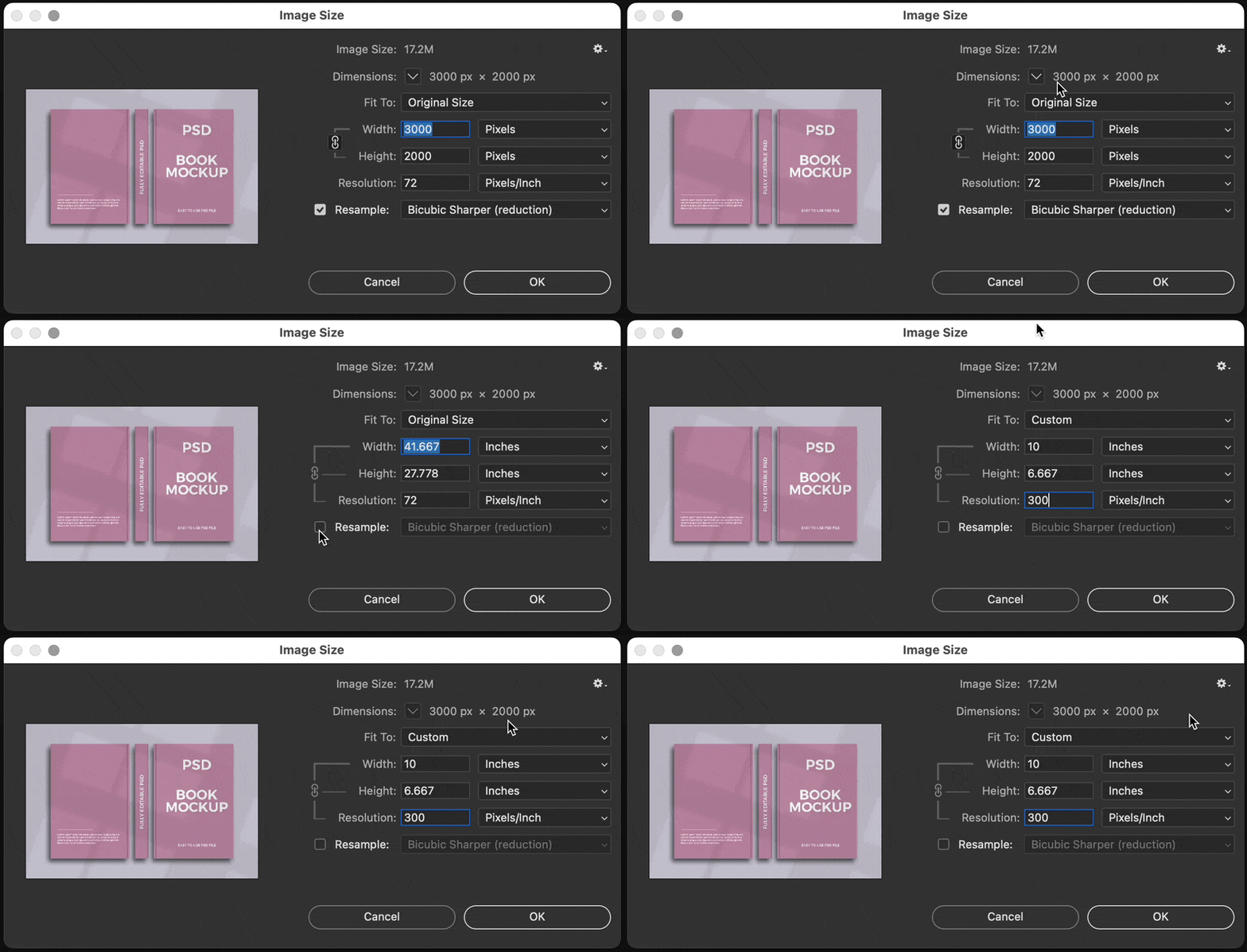
If you need different dimensions in inches, you can enter it in Width and Height, with Resample still disabled. If that causes the ppi value to drop too far, you can try again by enabling Resample, entering 300 ppi, and then entering a larger Width and Height. But resampling past what the image normally supports at a given ppi resolution will have to make up new pixels, which may cause a drop in image quality.



 AdChoices