
furcatanother
Participant
July 14, 2025
Question

How To Keep AI From Truncating the Object of Your Image

  • July 14, 2025
  • 1 reply
  • 179 views

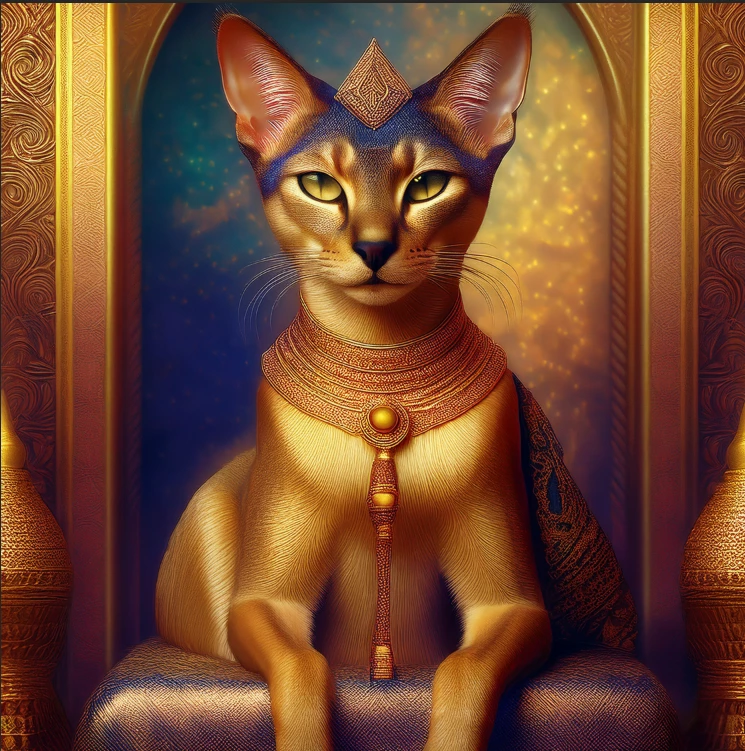
I have been using the AI image generator in Photoshop. I'm new to AI, but I have been using Photoshop for 25+ years. I am having difficulty generating an image where parts of what I have described is truncated. The images are gorgeous, but I can't use them if part of the subject is cut off. 


I have shown an image below where the paws of the cat I described is cut off. Is there a trick to use in your prompts to keep the image from being truncated?


26.6.1 Photoshop release


Thank you.


1 reply

CMass
Legend
July 14, 2025

Hey @furcatanother


It’s always amazing to meet someone else who has also used Photoshop for 25+ years, even if virtually! Can you share the prompt you're using and a screenshot of your workspace? That will help us get a better idea of what might be going on.


^CM

furcatanother
Participant
July 15, 2025

Greetings;


Actually, it's probably closer to 30 years ... I started with version 3.0 of Photoshop. And, my husband and I put together one of the first publically available linux-based web servers in the Kansas City area ... many years ago!


Here's the prompt that I have now. I've had a few variations, but they are similar:


"A female abyssinian cat dressed as Cleopatra as a pharoh with a black wig with gold headband with a serpent and sitting in a gold throne holding a pharoh staff in one hand."