
Known Participant
June 22, 2025
Question

How to keep paragraph text horizontally centered?

  • June 22, 2025
  • 2 replies
  • 618 views

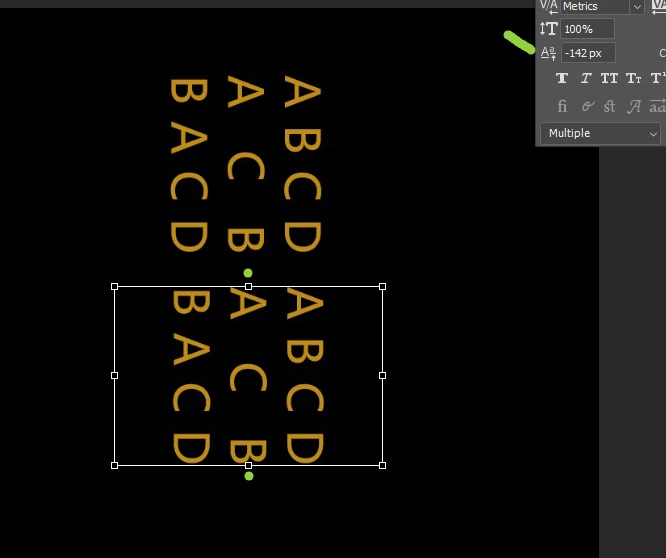
How to keep paragraph text always horizontally centered? No matter how many lines the text has, it should always remain horizontally centered. In my image, there are three text paragraphs. If there are four or two paragraphs, I'm not sure how to implement this using JSX code.
2 replies

jane-e
Community Expert
Community Expert
June 22, 2025

@w30290083o9nn 


Have you tried creating a Paragraph Style to control the paragraph level settings? 


You might also try Shift+Return instead of Return to keep all lines as one paragraph.


We can only see a small part of your Character panel, and I am very curious as to why you have shifted the baseline -142 pixels?


Jane

Known Participant
June 22, 2025

Hello, -142 pixels is because it moves the horizontal position of the text to the middle of the paragraph text frame

jane-e
Community Expert
Community Expert
June 22, 2025

Thank you @w30290083o9nn . Is your text frame printing or non-printing?


Jane

c.pfaffenbichler
Community Expert
Community Expert
June 22, 2025

Photoshop is not a good fit for this kind of work, Indesign (with its »Text Frame Options«) seems preferable. 


A relatively simple Script could evaluate the Type Layer’s bounds and offset it accordingly, but Asccenders and Descenders could confuse the issue. 

Using Baseline Shift instead (as your screenshot seems to indicate) might work … please provide the layered file. 

Known Participant
June 22, 2025

You're welcome!