Answered

This topic has been closed for replies.
The colors are a little light and yellowish, so you would want to darken those. And the shine is the result of a lot of contrast, so reducing contrast can help.
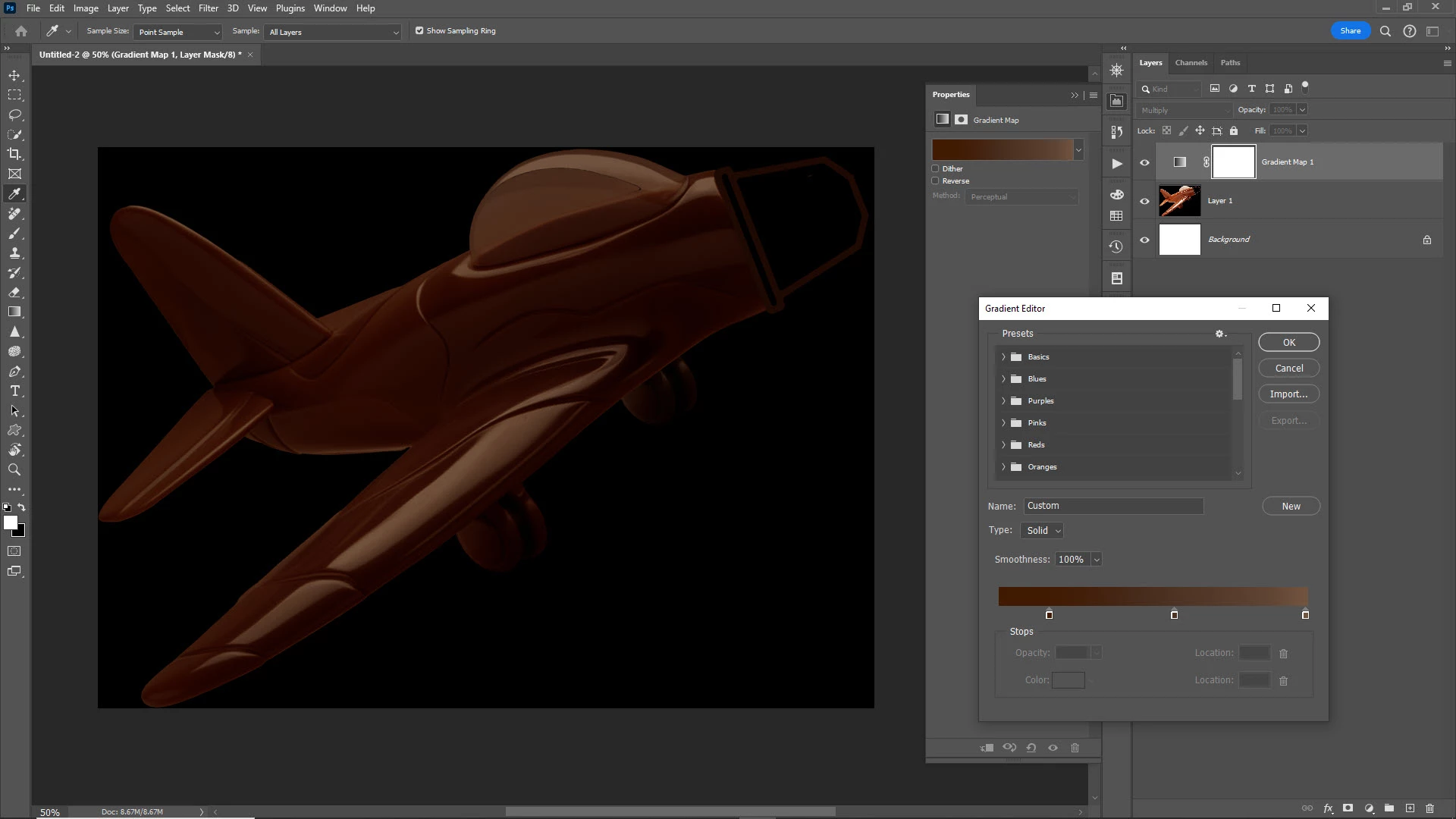
One way to do both at the same time is to add a gradient map adjustment layer (click the 4th icon from the left at the bottom of the Layers panel and select Gradient Map... or go to Layer > New Adjustment Layer > Gradient Map... Then you can set the ramp to be used. This gradient will remap to the colors in your image. Then you can add a blend mode and/or Opacity to adjust how it looks in the end.
Here's how I set up the gradient, and I also set the Gradient Map 1 layer to Multiply in the Layers panel.


Sign up
Already have an account? Login
To post, reply, or follow discussions, please sign in with your Adobe ID.
Sign inSign in to Adobe Community
No account yet? Create an account
To post, reply, or follow discussions, please sign in with your Adobe ID.
Sign inEnter your E-mail address. We'll send you an e-mail with instructions to reset your password.
 AdChoices