
Participant
January 13, 2025
Question

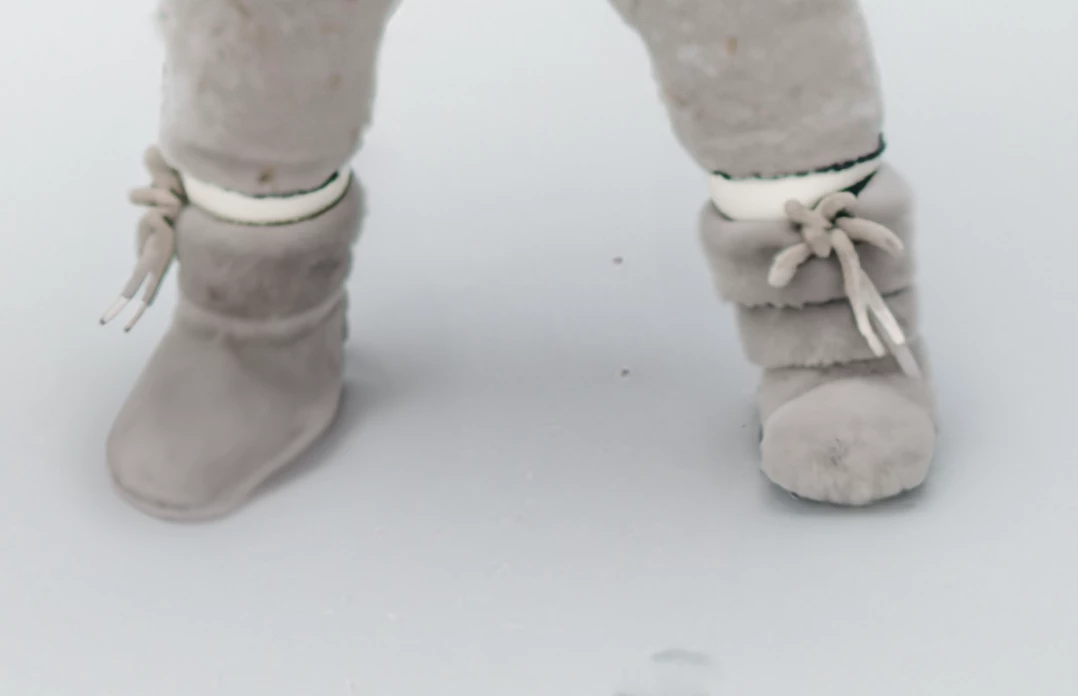
How to match another shoe already generated in Generative fill

  • January 13, 2025
  • 3 replies
  • 344 views

I want the left boot to match the right one and no matter what I do, it won't work. Is this possible? I can always select both boots and making matching new ones but I really like the one on the right!


3 replies

Myra Ferguson
Community Expert
Community Expert
January 14, 2025

Another option would be to use the Clone Stamp Tool but first use the Clone Source panel (Window > Clone Source) to click on the flip horizontal icon (it's the one directly to the left of the W:). When it's set to be flipped, that icon is darker than the background.

Trevor.Dennis
Community Expert
Community Expert
January 14, 2025

Generative Fill to remove the camera left leg similar to previous poster's suggestion

Copy and flip the camera right leg.

There were a few marks that made it obvious the leg had been copied, so I cleaned those up.

BTW  I did try Gen Fill and it did a half decent job.  It was a touch high in the frame, but I think that if I'd expanded the selection down a bit, it would have fixed that. 

Legend
January 14, 2025

I can think of ways to explore making the match -

Remove [tool] the lace on the right booty

copy the tied bow from the left booty to the right

-or-

copy the entire left foot to a new layer, flip it horizontally, replace the right foot with the reversed left foot, then mask out/remove to clean up.


At my iffy level of experience, the shadow could be troublesome.


That Trevor is speedy!

Larry