Participant
May 15, 2024
Question

how to merge camera raw filter in photoshop with frequency layers

  • May 15, 2024
  • 2 replies
  • 374 views

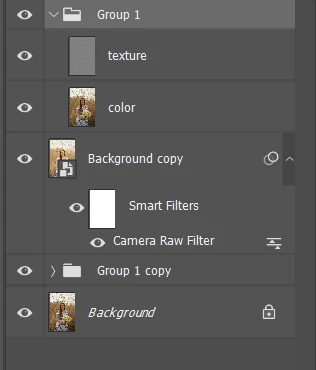
Hi! how to merge camera raw filter in photoshop with frequency layers? Because the changes I did on camera raw doesn't show unless I hide frequency separation layers. 
This topic has been closed for replies.

2 replies

Stephen Marsh
Community Expert
Community Expert
May 19, 2024

@ann3420043 – I agree with @c.pfaffenbichler, you need to setup the layers differently.


The Background copy layer which is a smart object, that should be edited and the frequency separation edits performed on the edited smart object. That way you can have both the Camera raw filter and the frequency separation applied to the same layer, allowing you to delete the Group 1 containing the original frequency separation layers (what you have named texture [high frequency] and color [low frequency]).

c.pfaffenbichler
Community Expert
Community Expert
May 19, 2024

But editing the Camera Raw Filter on one instance would then necesitate tranferring it to the other. 

That’s why I mentioned the SO (with Camera Raw Filter) in SO (with Frequency Separation Filtering) approach. 

Stephen Marsh
Community Expert
Community Expert
May 20, 2024

@c.pfaffenbichler – Perhaps I'm missing some nuance here then. I would think that a single SO layer containing the frequency separation layers is all that is needed. Then apply the CR filter to the single SO layer. I didn't see the need for a Matryoshka. 

c.pfaffenbichler
Community Expert
Community Expert
May 18, 2024

That seems to be what you decided upon with your Layer setup. 


How did you edit the Layers »color« and »texture«? 

If with Filters you could convert the SO »Background copy« to a SO and apply the Filters to two instances of that to recreate the Frequency Separation, but to edit the Camera Raw Filter you would then need to open the SO. 

If with »Calculations« then it would not seem to be so easy.
