Known Participant
February 24, 2025
Answered

How to replicate this effect?

Hi community, 

I am looking to replicate this effect on the background through Photoshop. It seems to be an overlay with a mix of effects applied to it; I've tried to replicate it using glow, distortion, chromatic aberration, and dithering, but without success.

Does someone know how I could replicate it in Photoshop?

Thanks! 

Conrad_C
Conrad_CCorrect answer
Community Expert
February 24, 2025

This try has two steps:

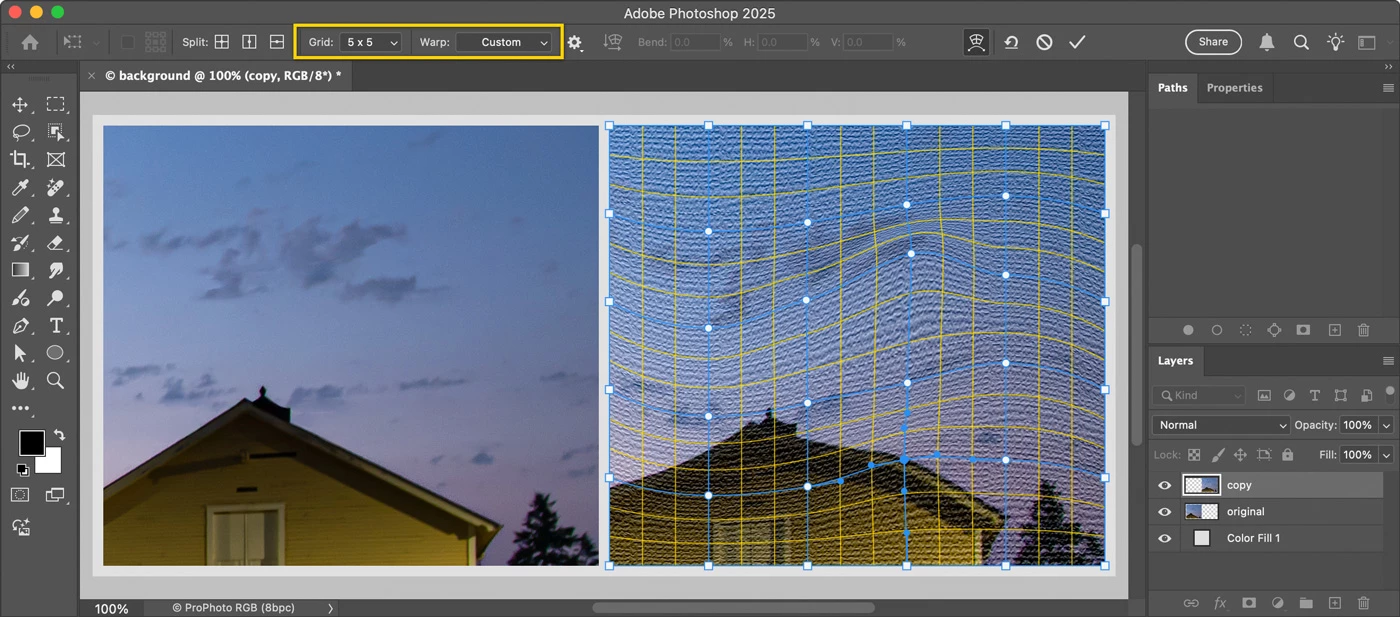
1. Choose the command Filter > Filter Gallery, apply Texturizer with Burlap. 

2. Choose Edit > Transform > Warp, apply a Warp type of Wave or Twist. If needed, drag warp handles and use a custom Grid size. 


4 replies

Trevor.Dennis
Community Expert
Community Expert
February 24, 2025

Another approach:

Working on a 50% grey layer set to Overlay

I used Halftone > Line

Distort > Wave (set to Sine)


Hmmm, it doesn't look like that in Photoshop.  I think there is some moire effect going on. I suspect that the moire will disappear if you click to expand.


[EDIT] Yes, that was indeed the case.  The sine wave is regular and repeats, but can be warped to change that.


Translate
Conrad_C
Community Expert
Conrad_CCommunity ExpertCorrect answer
Community Expert
February 24, 2025

This try has two steps:

1. Choose the command Filter > Filter Gallery, apply Texturizer with Burlap. 

2. Choose Edit > Transform > Warp, apply a Warp type of Wave or Twist. If needed, drag warp handles and use a custom Grid size. 


Translate
Known Participant
February 25, 2025

This is awesome thanks!

Translate
melissapiccone
Community Expert
Community Expert
February 24, 2025

Play with the color halftone filter... 

Translate
Melissa Piccone | Adobe Trainer | Online Courses Author | Fine Artist