Known Participant
December 21, 2019
Question

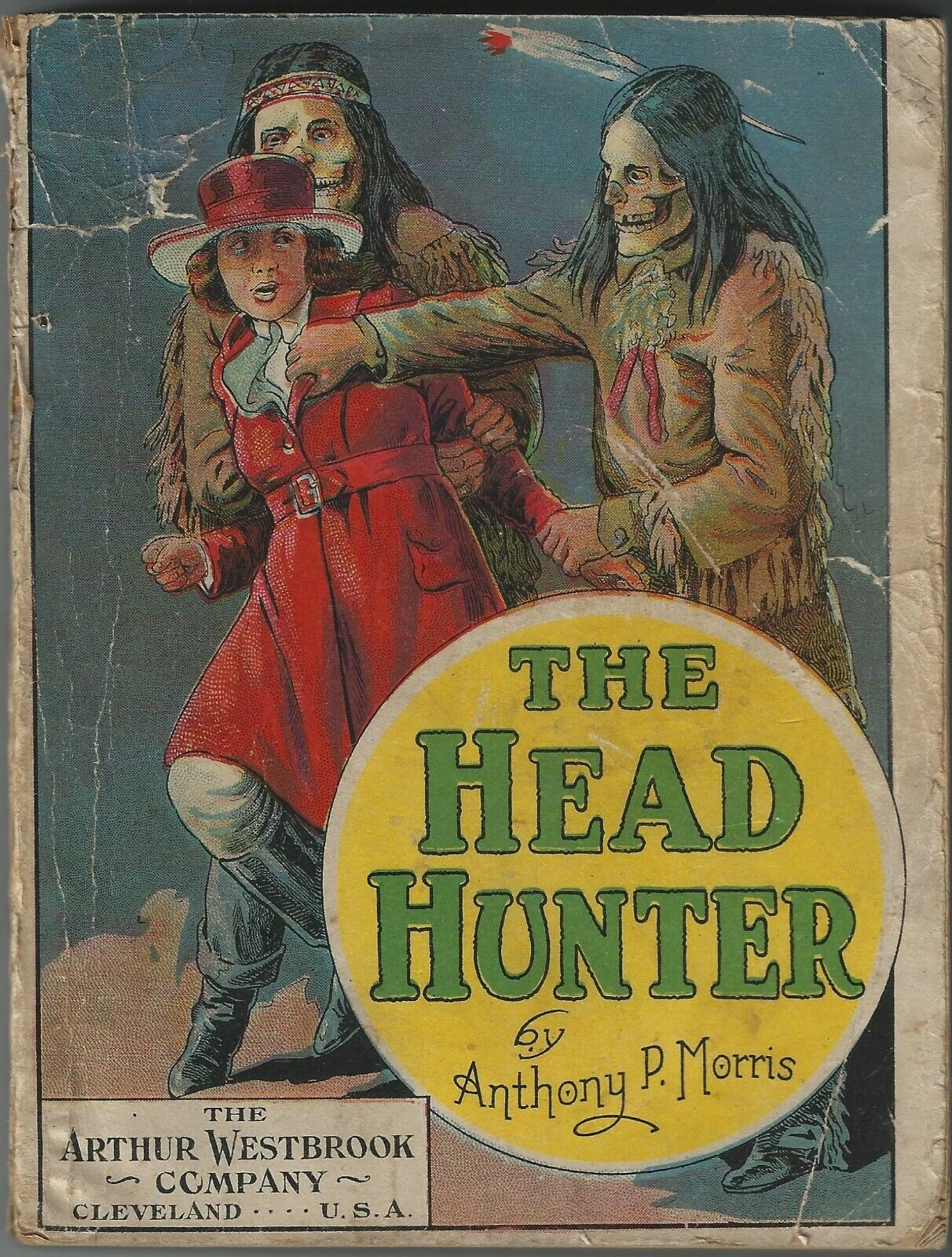
How to reposition a red layer to line up in a badly printed vintage color image?

  • December 21, 2019
  • 5 replies
  • 907 views

The color printing on the original cover is way too off for a new reprinted book.

Is there a way that I can isolate the red layer and move it into a better position? Or should I do the erase-red-and-clone-into-it-the-right-color thing?


This topic has been closed for replies.

5 replies

Inspiring
December 21, 2019

Technically, you cannot do any edits or modifications without written premission from the copyright holder.  That said, there must be an "original" illustration somewhere.  The original artwork would tell you a lot of things about the quality.  If somehow the color was created manually in the print process, there are photograhic negatives ( flats ) and press plates that exist or do not exist.  The flats would be optimal in that they can be "registered" better before making the plates.  You could also contact the illustrator or copyright beneficiary, and get either a scan or a digital pic of the original ( which you will want to have as an archive ). 

D Fosse
Community Expert
Community Expert
December 21, 2019

Assuming standard CMYK print, red misalignment is actually the cyan plate being out of register. The black plate is also off, but not quite as much. Magenta and yellow are in perfect register. By itself this could easily be corrected by converting to CMYK.


What makes it impossible is the torn and folded paper - the background texture. That would of course be pushed out of register, which would look very weird. It would be necessary to clean up completely first and neutralize the background. It wouldn't have to be white, but it would have to be textureless.


All that said I agree with the others. The vintage charm is part of it and I wouldn't do it even if it was possible.

alexkayvisuals
Participant
December 21, 2019

As Test_Screen_Name said: the red plate was misaligned during the printing. To fix that you may need to align and straighten the image first. Then go to Red Channel, copy and paste it, and then realign accordingly. It is totally doable, but I am not sure it's worth it. I would reprint using the off-color, because it has a certain feel.

dnemeth01Author
Known Participant
December 21, 2019

I cant find "Red Channel."  I have the old CS3 version but am upgrading to the current photoshop when I get a new laptop soon.

This was part of a print run that had misalignment problems.  The two others online look much more better. 

Legend
December 21, 2019

I'd say the misaligned red plate is part of its vintage charm,like the tears and the subject, and you correct it at your peril (that is, you may alienate those attracted to it). The chances are that the whole print run was much the same. There may also be more to it than misalignment; these were probably hand coloured separation guides, which were not necessarily ever 100% accurate.

Bojan Živković11378569
Community Expert
Community Expert
December 21, 2019

If I can understand your question about moving then the answr is no, you can not simply move red color. The second part is to erase and clone and that is possible although I am not sure why you want to erase? 

My suggestion is to use separate blank layer for whatever you decide to do. Clone Stamp tool can work on separte layer, just turn that option on in the Options bar.