Participant
October 2, 2021
Question

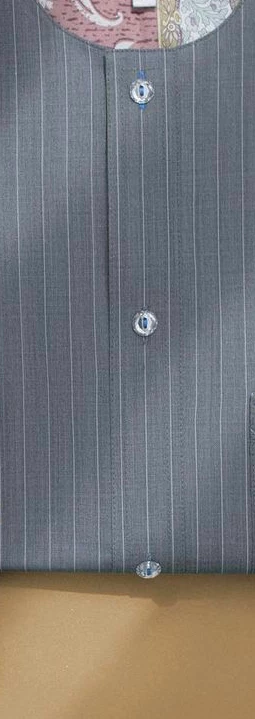
How to smoothen cloth with pattern on photoshop

  • October 2, 2021
  • 3 replies
  • 8843 views

This topic has been closed for replies.

3 replies

barbara_a7746676
Community Expert
Community Expert
October 3, 2021

No easy way to do this that I can think of.

You could create a pattern and use it to fill the area.

Select a portion of the fabric that is fairly uniform. If it isn't uniform enough, touch it up so that there are no obvious variations.

Select Edit > Define Pattern.

Make a selection of the area you want to fill.

It would be a good idea to create a new layer.

Then choose Edit > Fill. Select Pattern from the dropdown list and scroll to your new pattern at the end of the pattern list.


davescm
Community Expert
Community Expert
October 3, 2021

Hi

A combination of :

a. Frequency separation cloning the low to get rid of the shadows and the dreadful moire colouring

b. Spot healing to take out the stripes

c. A white brush to paint in new stripes

d. Cloning the edge on the high frequency layer


The reality though, if you have a few of these o do, is that rephotographing them carefully will save a lot of time in Photoshop


Dave


Nancy OShea
Community Expert
Community Expert
October 3, 2021

To remove wrinkles from clothing, use Frequency Separation. See video.


Nancy O'Shea— Product User & Community Expert
Participant
October 3, 2021

Thanks a lot...I have tried this method but it doesn't remove major folds and it distorts the pattern. I want it to be totally Smooth and Flat. I don't know if that's possible

Nancy OShea
Community Expert
Community Expert
October 3, 2021

You could try restoring pattern with patch and/or healing brush tools.  But this will take a while.


The simplest solution would be to re-shoot the photo.  Pin fabric to a flat form and use multiple light sources to eliminate shadows.


Nancy O'Shea— Product User & Community Expert