SteveJM
Inspiring
April 21, 2025
Beantwortet

How to turn off Auto Update?

  • April 21, 2025
  • 1 Antwort
  • 641 Ansichten

Hi.

I'm trying to turn off Auto Updates in creative Cloud for all my apps, but when I uncheck  "Auto Update", and "remove older versions" , after clicking done, nothing happens, they are all still checked as Auto.

I really don't want this, I like to manually choose to update etc.

Any idea how to actually turn this off?

I'm running Win 11

Cheers.

Steve.

Beste Antwort von D Fosse

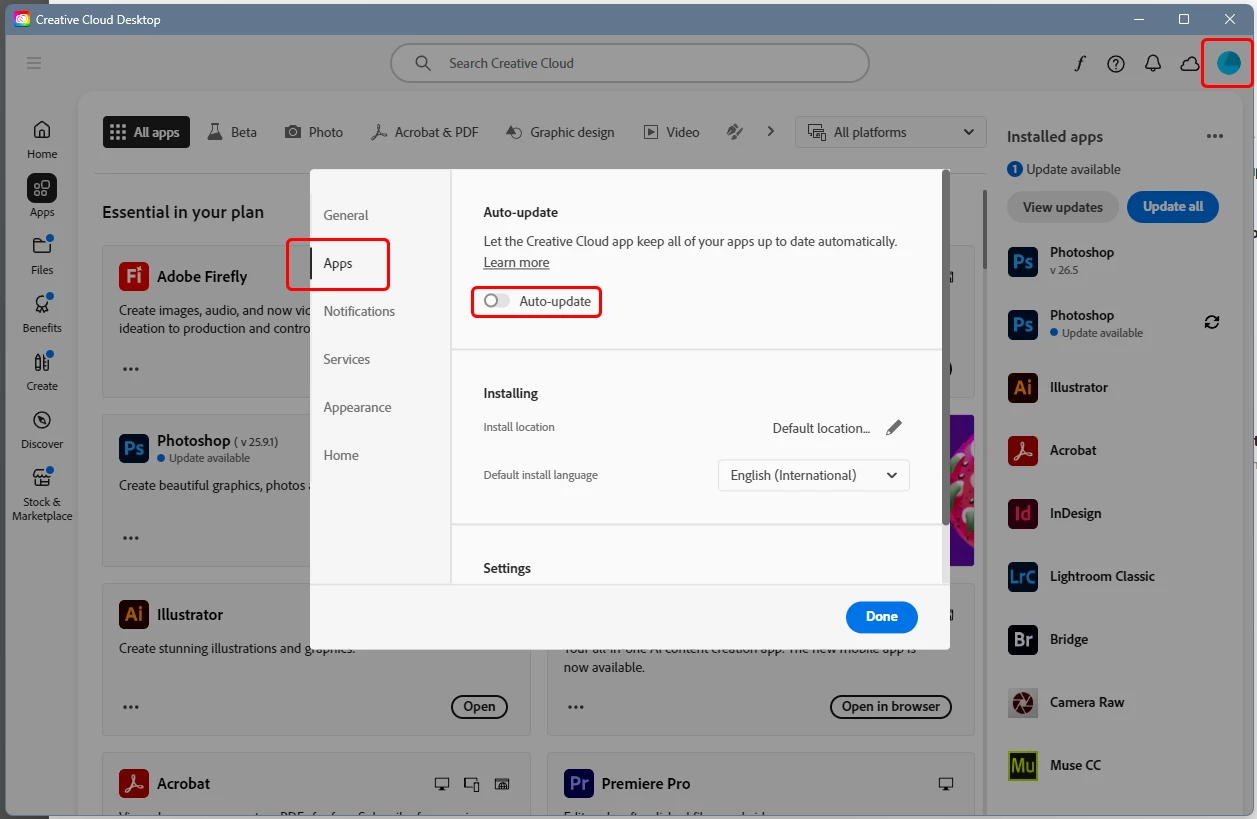
This is where you turn it off:


If it doesn't stick, sign out and back in. If that doesn't do it either, I'd reinstall the CC app.

1 Antwort

D Fosse
Community Expert
D FosseCommunity ExpertAntwort
Community Expert
April 21, 2025

This is where you turn it off:


If it doesn't stick, sign out and back in. If that doesn't do it either, I'd reinstall the CC app.

SteveJM
SteveJMAutor
Inspiring
April 21, 2025

Thanks 🙂

Yeh, that's what I've been trying, it just goes back to Auto.

Tried logging out then back in, no luck there either.

Just had a CC update, I wonder if that's the problem?

Next thing is I will try a re-install.

Cheers.

Steve.