Known Participant
May 14, 2024
Answered

How to turn off the stupid blue lines?

  • May 14, 2024
  • 2 replies
  • 3263 views

Hi everybody,


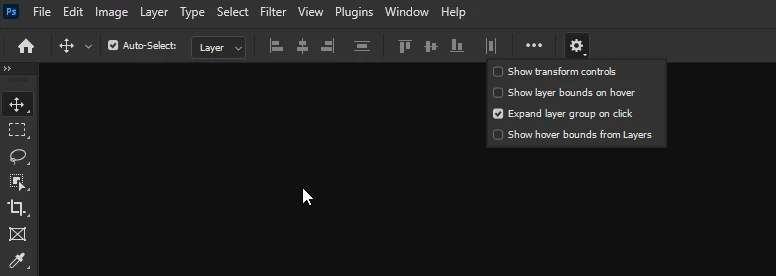
I don't know what these things are called, they're not guides. These blue lines show up whenever I rollover something -- utterly obnoxious. What are they and how can I turn them off? They're not easily found under the >View tab. 


Please help. 

Correct answer Ged_Traynor

@Max DT you can disable it from here

2 replies

Participant
December 26, 2024

Hi, I disabled this in the cog, but it still has the blue line. Do I need to uninstall and reinstall or?

Ged_Traynor
Community Expert
Community Expert
December 27, 2024

@josh_7062 can you post a screenshot of the Photoshop interface to highlight the issue

Participant
December 27, 2024

Ged_Traynor
Community Expert
Ged_TraynorCommunity ExpertCorrect answer
Community Expert
May 14, 2024

@Max DT you can disable it from here

Max DTAuthor
Known Participant
May 14, 2024

Ugh, thank you! They need to put that in View > Extras if Extras turns it off. I like/need my guides but that was driving crazy. Thank you again for such a swift response.

Ged_Traynor
Community Expert
Community Expert
May 14, 2024

You're welcome 🙂