Known Participant
Jun 28, 2025 3:03 AM UTC
Answered

How to 'unautomate' a clipping mask each time I apply a mask. Please help!

Good morning. I remember some time ago, altering something, somewhere in Photoshop, so that each time I apply a mask, it is clipped to the layer below it. I did not create an action (I was new to Photoshop).   The automated use of the clipping mask is driving me nuts, now that I am actually more proficient in Photoshop. I can't find where I can stop getting a clipping mask each time I add a mask. 

I am wondering if I altered something in my Photoshop Settings/Preferences.

I use a iMac. I would so appreciate getting rid of the automated clipping so that I can apply one if I need one, but not have each and every mask clipped each time I add a mask.

Many thanks in advance

 

Trevor.Dennis
Trevor.DennisCorrect answer
Community Expert
Jun 28, 2025 4:38 AM UTC

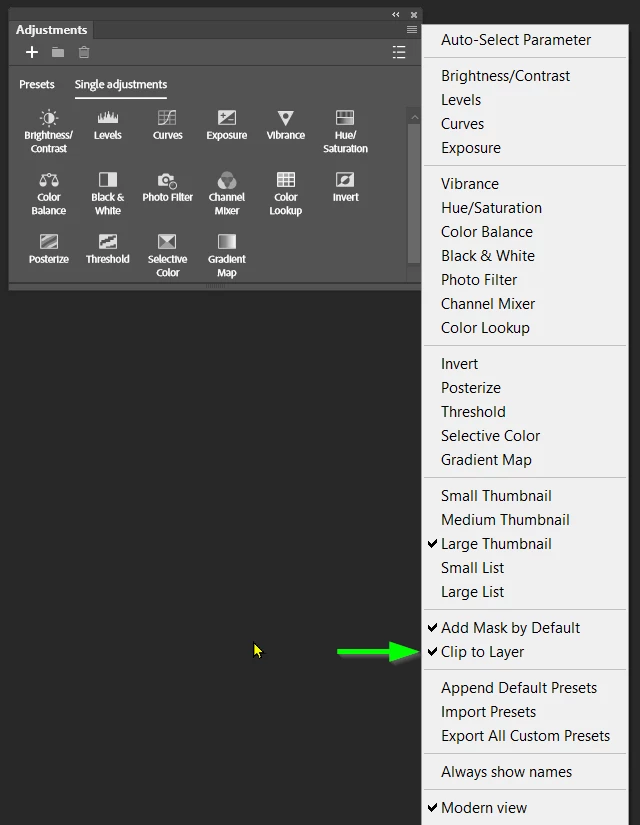
I suspect you have Clip to Layer  checked in the Adustment Layer drop-down menu.


7 replies

c.pfaffenbichler
Community Expert
Community Expert
Jun 28, 2025 9:25 AM UTC

»apply a mask« to what? 

Please popst a screen recording or screenshots inclusing all pertinent Panels to illustrate the process. 

Translate
Known Participant
Jun 29, 2025 4:43 AM UTC

In this case Trevor has assisted me with addressing my query correctly. However, I take your point. I should have included a screen shot. Thank you for your reminder. I appreciate it. 

Translate
Trevor.Dennis
Community Expert
Trevor.DennisCommunity ExpertCorrect answer
Community Expert
Jun 28, 2025 4:38 AM UTC

I suspect you have Clip to Layer  checked in the Adustment Layer drop-down menu.


Translate
Stephen Marsh
Community Expert
Community Expert
Jun 28, 2025 11:57 AM UTC

@Trevor.Dennis I was looking in the layer options for that!

Translate
Stephen Marsh
Community Expert
Community Expert
Jun 28, 2025 3:38 AM UTC

Perhaps it was via the Script Events Manager, by setting an action or script to automatically run when triggered by the appropriate event.


Check to see what's under File > Scripts > Script Events Manager


https://prepression.blogspot.com/2021/10/photoshop-script-events-manager.html

Translate
Known Participant
Jun 29, 2025 4:40 AM UTC

Thank you Stephen. in this case trevor solved my issue, but I so want to thank you for thaking the time to consider an answer to a question that has seen me waste so much time in trying to solve it.  I should hve come back to the group for suggestions far sooner than I did. 

Translate