Participant
April 10, 2021
Answered

How to upgrade photoshop Cc 2019 to 2021?

  • April 10, 2021
  • 3 replies
  • 4438 views

Hi Adobe Community Team, I want to know that how to upgrade photoshop from the 2019 Version to the 2021 Version. Is there any way? Please Adobe Community Team, Give me a reply. Thanks!

Correct answer Trevor.Dennis

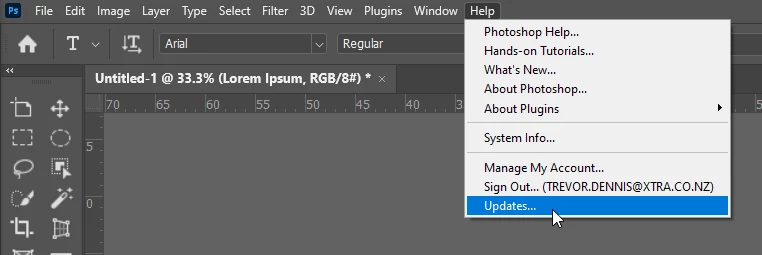
Or use the Help menu

3 replies

Participant
November 28, 2022

Step 1: Open the Creative Cloud desktop app.
Step 2: Choose the Updates category.
Step 3: Click the Update button.


Hope this helps.

Trevor.Dennis
Community Expert
Trevor.DennisCommunity ExpertCorrect answer
Community Expert
April 12, 2021

Or use the Help menu

Akash Sharma
Legend
April 12, 2021

Hi there,


You can update Photoshop from the CC 2019 version to 2021 version using the Creative Cloud Desktop app.


Launch Photoshop and choose Help > Updates and update to the latest app version available.

See Update Creative Cloud apps.


Please note that your computer must be compatible with the Photoshop v 2021 in order to install it. See: https://helpx.adobe.com/photoshop/system-requirements.html 


Please take a look at this article for details on how to update: https://helpx.adobe.com/photoshop/kb/uptodate.html#VerifyPS 


Thanks,

Akash

Participant
November 27, 2022

I just spent 45 minutes on the Chat with a tech.  I have the 2021 version of PS and there were so many bugs, especially with text that I wanted to upgrade and didn't quite know where to go or how to do it.  In the end, let me just say that in the end I kept waiting for him to answer a question, the time ran out, the conversation ended without my knowing it.  I read your suggestion above, went to try that and lo and behold I know have the 2022 version.  It would have been nice if this tech had actually had the manners to tell me he did that.  That wasw not a professional way to handle this.  I'm glad I ran across your solution here.  Thank you!