



How to use a script to open an image and skip displaying it at "screen 100%" size, and display it directly at "screen 70%"?
Please, master, study this code again.
I still think this transition is a bit time-consuming.
I want to use a script to open an image and display it at 70% of the screen size.
But I found that every time the image is opened, it is displayed at 100% screen size and then switched to 70% size, with a transition in between that takes about 1 second, which is a bit uncomfortable.
May I ask if it is possible to display it directly at 70% screen size after opening it?
Also, there is a problem:
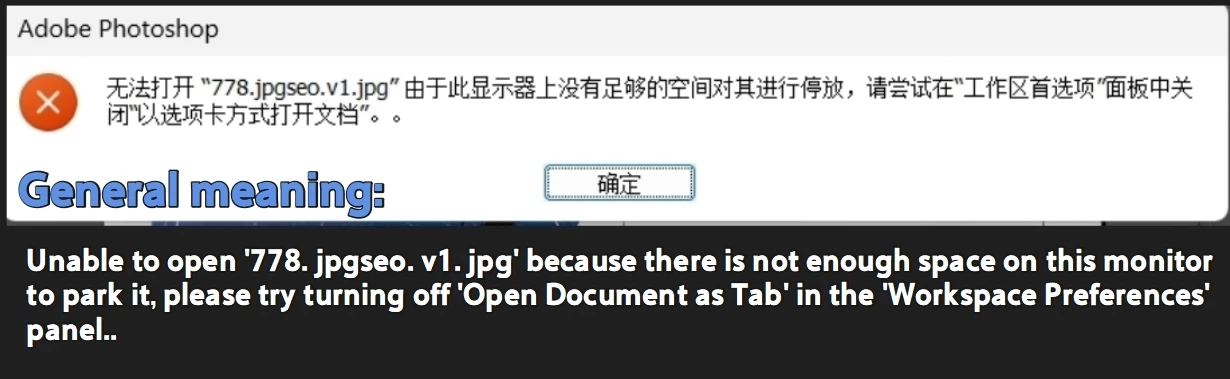
when I call this script from Indesign, I often get an error saying that my monitor doesn't have space to park images?
I have searched for solutions:
Cancel the tab to open the document (I think this is inconvenient and not adopted);
Reset workspace. I have tried, but problems still arise.
        /** Zoom to 46 % of Fit On Screen Zoom
        Stephen Marsh
        https://community.adobe.com/questions-712/can-this-script-be-modified-to-fit-46-of-the-screen-1560318
        **/
        //#target photoshop
        // Fit on Screen
        var fitDesc = new ActionDescriptor();
        var ref = new ActionReference();
        ref.putEnumerated(charIDToTypeID("Mn  "), charIDToTypeID("MnIt"), charIDToTypeID("FtOn"));

        fitDesc.putReference(charIDToTypeID("null"), ref);
        executeAction(charIDToTypeID("slct"), fitDesc, DialogModes.NO);

        // Read the the current zoom
        var docRef = new ActionReference();
        docRef.putEnumerated(charIDToTypeID("Dcmn"), charIDToTypeID("Ordn"), charIDToTypeID("Trgt"));
        var docDesc = executeActionGet(docRef);

        var fitZoom = docDesc.getDouble(stringIDToTypeID("zoom")) * 100;
        // Calculate the target zoom
        var FACTOR = 0.70;
        var targetZoom = fitZoom * FACTOR;
        // Apply the calculated zoom
        setZoomLevel(targetZoom);
        // Optional confirmation
        //alert("Fit zoom: " + Math.round(fitZoom * 10) / 10 + "%\n" + "Target (" + (FACTOR * 100) + "% factor): " + Math.round(targetZoom * 10) / 10 + "%");
        ///// FUNCTIONS /////
        function setZoomLevel(zoomPercent) {
            if (zoomPercent < 1) zoomPercent = 1;
            var originalRes = activeDocument.resolution;
            // Get the screen resolution
            var screenRef = new ActionReference();
            screenRef.putEnumerated(charIDToTypeID("capp"), charIDToTypeID("Ordn"), charIDToTypeID("Trgt"));
            var screenRes = executeActionGet(screenRef)
                .getObjectValue(stringIDToTypeID("unitsPrefs"))
                .getUnitDoubleValue(stringIDToTypeID("newDocPresetScreenResolution")) / 72;
            // Change the resolution temporarily
            activeDocument.resizeImage(undefined, undefined, screenRes / (zoomPercent / 100), ResampleMethod.NONE);
            // Zoom to print size
            var printDesc = new ActionDescriptor();
            var printRef = new ActionReference();
            printRef.putEnumerated(charIDToTypeID("Mn  "), charIDToTypeID("MnIt"), charIDToTypeID("PrnS"));
            printDesc.putReference(charIDToTypeID("null"), printRef);
            executeAction(charIDToTypeID("slct"), printDesc, DialogModes.NO);
            // Restore the original resolution
            activeDocument.resizeImage(undefined, undefined, originalRes, ResampleMethod.NONE);
        }

        //This sentence can only be placed at the end
        try {
            executeAction(sTID('imageSize'), undefined, DialogModes.ALL);
        } catch (e) { if (e.number != 8007) { alert("Line: " + e.line + "\n\n" + e, "Bug!", true); throw (e); } }
 AdChoices