MarcIng
Participating Frequently
January 18, 2023
Answered

How to vertical align (to top middle or bottom) horizontal text

  • January 18, 2023
  • 5 replies
  • 13678 views

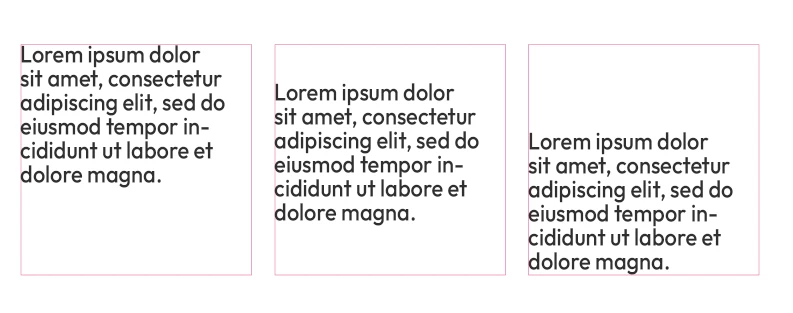
Is it possible to align horizontal text vertically in a paragraph in photoshop? I have many files where there is a text change and the texts need to be vertically centered. However the lengths of the texts are different. In Indesign this is easy but I can't find it in Photoshop.

Correct answer olivierd42825091

Hi,


As c.pfaffenbichler said, there is no text option in PS for a vertical alignement in text blocs. There is a workaround that might help but it involves Illustrator:


- Create a text bloc in Illustrator and set it up to align text vertically (from the "Text "menu ), you can still use justified text and so on.
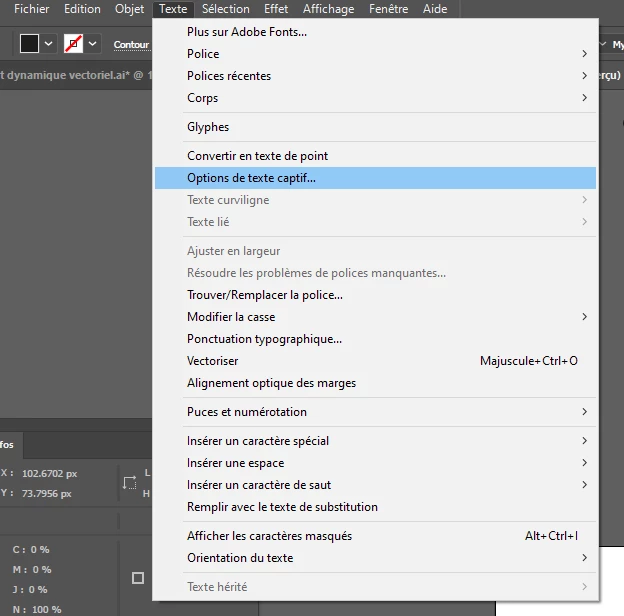
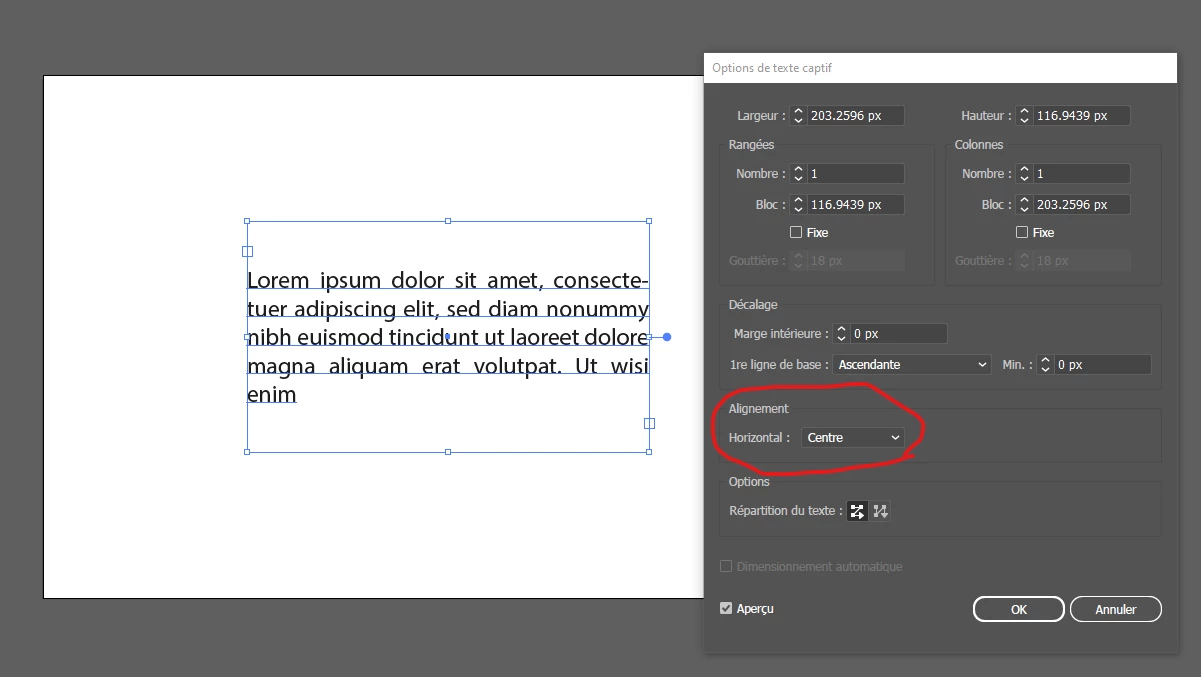
- Copy that text bloc with ctrl+c, and paste it in PS as a smart object. Then align that smart object in the center of your PSD.


You can probably optimise your workflow better if you create an illustrator file with many artboards (with a centered text bloc on each artboard) and then placing this .ai file in your psd.

Just select the right artboard every time you place your .ai file in the psd.

That way you could edit the ai file for all instances on your psd.


Hope that helps.


Regards,

5 replies

Participant
September 14, 2025

This should have been in Photoshop ten years ago. Don't care that it can be done in InDesign thats a separate program and this is an elementary feature. It's a simple, straightforward workflow issue, especially if you like to use shapes to spice up text containers.

Participant
October 23, 2024

In Google Slides, this is just one of the paragraph options, as in horizontal and vertical alignment of the paragraph in its text box. I find it really surprising that an application as simple as google slides has an option for this yet photoshop not have a one-click way to do this. 

jane-e
Community Expert
Community Expert
October 23, 2024
quote

yet photoshop not have a one-click way to do this. 

By @Emily389090105y9y


Adobe InDesign has both vertical and horizontal alignment. Photoshop's core function is an image editor, although it does have basic text features.


Jane


olivierd42825091Correct answer
Inspiring
January 18, 2023

Hi,


As c.pfaffenbichler said, there is no text option in PS for a vertical alignement in text blocs. There is a workaround that might help but it involves Illustrator:


- Create a text bloc in Illustrator and set it up to align text vertically (from the "Text "menu ), you can still use justified text and so on.

- Copy that text bloc with ctrl+c, and paste it in PS as a smart object. Then align that smart object in the center of your PSD.


You can probably optimise your workflow better if you create an illustrator file with many artboards (with a centered text bloc on each artboard) and then placing this .ai file in your psd.

Just select the right artboard every time you place your .ai file in the psd.

That way you could edit the ai file for all instances on your psd.


Hope that helps.


Regards,

MarcIng
MarcIngAuthor
Participating Frequently
January 18, 2023

Hey Olivier,


Don't know if it will work but I'll give it a try. Of course I make all my printwork in Indesign, I use a lot of Adobe apps. But I have a lot of files in PH who have automatic text import in 4 languages. I switch these text layers through the datasets under "images". They are all files for use on the internet. Working in PH is much easier than always having to switch between indesign etc.


Tnx a lot for your idea.


c.pfaffenbichler
Community Expert
Community Expert
January 18, 2023

@jane-e ’s paragraph returns-concept could probably be automated with a Script one would have to run on the psd after the Type Layers have been updated with the new text – if the text in the Type Layers is homogenous, that is.

jane-e
Community Expert
Community Expert
January 18, 2023

@MarcIng 


InDesign, with robust controls for type has four choices for vertical alignment: top, bottom, center, and justified. Photoshop, with limited controls for type, has one choice. InDesign also has insets on one or all four sides.


Most of us would pick the correct application, but we understand that sometimes it's not your choice. In addition to what @c.pfaffenbichler said, you can try manual fixes such as (tedious) paragraph returns.


Jane


c.pfaffenbichler
Community Expert
Community Expert
January 18, 2023

In Indesign this is easy but I can't find it in Photoshop.

That’s because Indesign is a page-layout-application while Photoshop is still primarily image-editing-software. 

Type-heavy layouts should ideally be done in the appropriate program/s. 


Depending on the frequency of the task it might pay off to create an Action or Script to align the Type Layer to some element that corresponds to the current paragraph-box (some Channel, Path, Layer, …) based on its transparency. 

This might cause some irregular results depending on the letters in the topmost and lowermost lines.