


JimS2000
Participant
August 30, 2026
Question

I purchased a color wheel in Adobe Exchange, now I can't find it!

  • August 30, 2026
  • 5 replies
  • 30 views

I went to the Adobe Exchange looking for a color wheel. I previously purchased Coolorus and installed it. I see it in the Scripts folder of Photoshop, but I can’t find it when I launch Photoshop 2026. I thought maybe it was not compatible. So, I went to the Adobe Exchange and purchased “MagicPicker”. I installed that. I see it in the scripts folder. Again, when I launch Photoshop 2026, I can’t find it!!!

I open the Plugins Panel and it’s NOT there! I clicked on the Windows menu and it’s not there either. I searched for help online and all the videos, articles, etc. Say to copy it to the Plugins Folder of Photoshop. Did that and relaunched Photoshop 2026 and I still cannot find it! Where is it?! How do I access my plugins I purchased?! This is extremely frustrating. Why does Adobe make this so hard?!

    5 replies

    Jeff Arola
    Community Expert
    Community Expert
    August 31, 2026

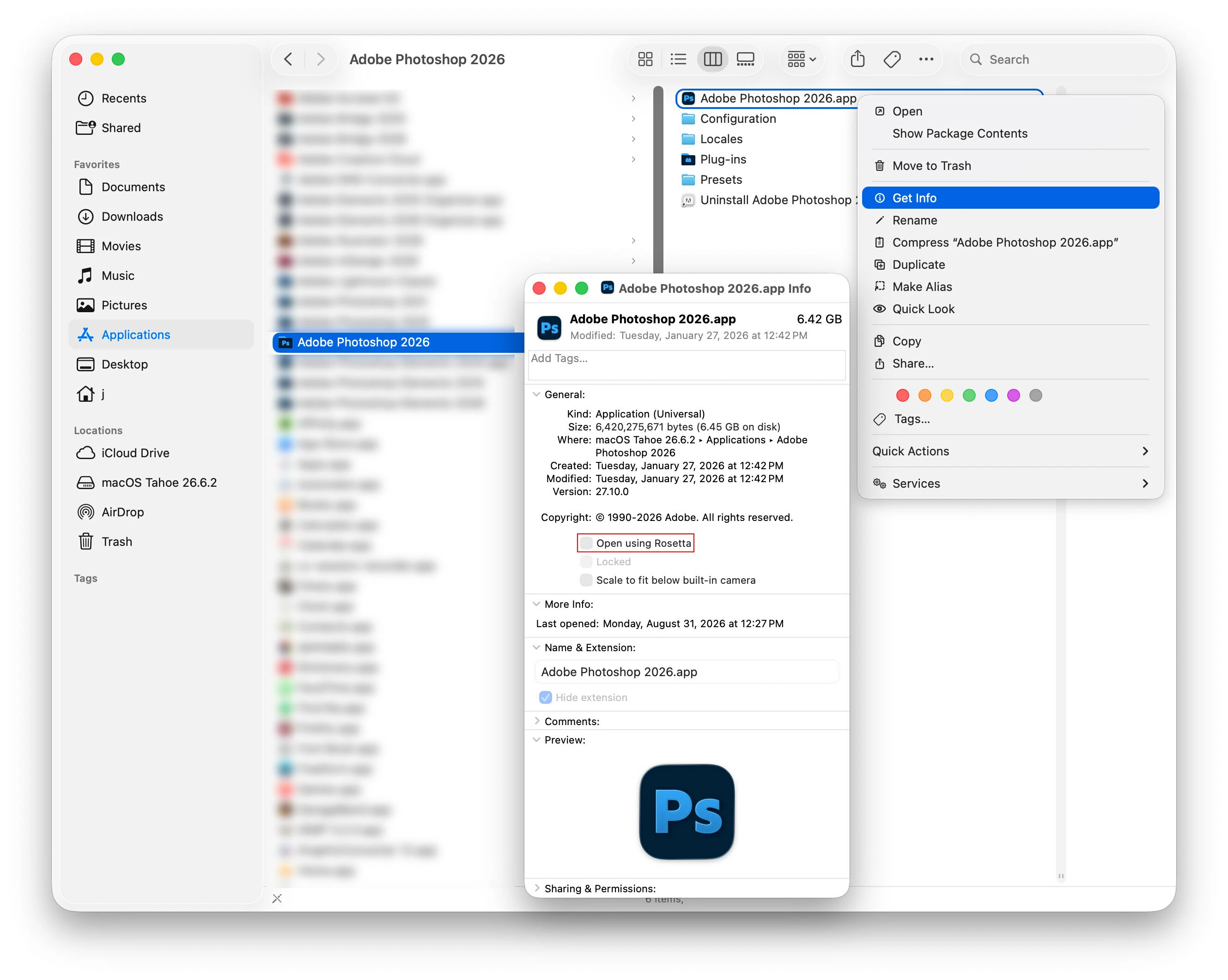
    From what i can gather on the Coolorus website, for Apple Silicon Macs, Photoshop needs too be run under Rosetta and perhaps it’s the same for Magic Picker.


    To do that go to Applications/Adobe Photoshop 2026, right click on the Adobe Photoshop 2026.app, then click Get Info and check Open using Rosetta.


    After that look under Window>Extensions.


    Jeff Arola
    Community Expert
    Community Expert
    August 31, 2026

    What operating system are you using?

    JimS2000
    JimS2000Author
    Participant
    August 31, 2026

    It’s a Mac, so iOS. I have the most recent version Tahoe 26.6.2

    JimS2000
    JimS2000Author
    Participant
    August 31, 2026

    I’ve been researching and everyone is saying to go Windows>Extensions>, but there is no menu item “Extensions” under “Windows” in Photoshop 2026! I go to Plugins Panel and there is nothing there either!