

I tried to use generative upscale to enlarge an album cover, but a nude illustration on the cover is preventing it.
I tried to use Firefly upscaler to enlarge an album cover, but I’m getting a guidelines error.
“We encountered and issue with your result. Please view our guidelines and try again."
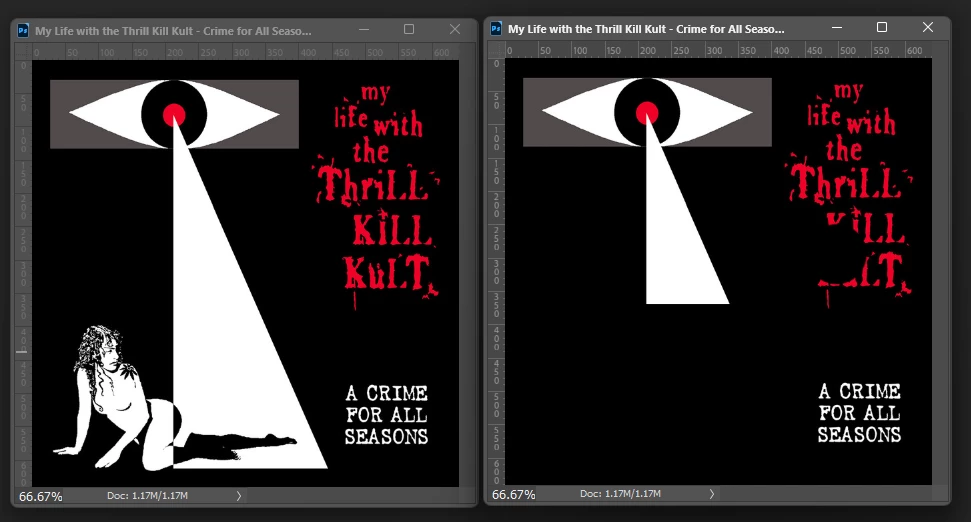
The problem is a very simple and tasteful nude illustration on the cover. If I remove the nude artwork, the upscale is generated without any problems. Images are below. Image on left would not upscale, but the image on the right upscaled without a problem. While I understand this is intended to prevent users from creating pornography or images with explicit nudity, this image is clearly neither of those things. I was able to use a competitors software to get the job done, but it would be a more efficient workflow to stay in Photoshop. I've seen numerous posts from users in the fashion industry that cannot upscale images for the same reason. If you worked for a publication like Playboy, I would imagine the generative tools would be completely useless for editing their content.
There needs to be more fine tuning to this upscaler AI so it isn't so heavy-handed and puritanical.


 AdChoices