Participant
July 9, 2022
Answered

I wanna add peace hand to my photo

  • July 9, 2022
  • 3 replies
  • 2856 views

Hello firends , this is my old photo but i wanna add this photo Peace Hand ✌️ near my face. I hope someone can help me. Thanks alot adobe community 


This is the original photo link :

[weblink removed by moderator]



Correct answer Conrad_C

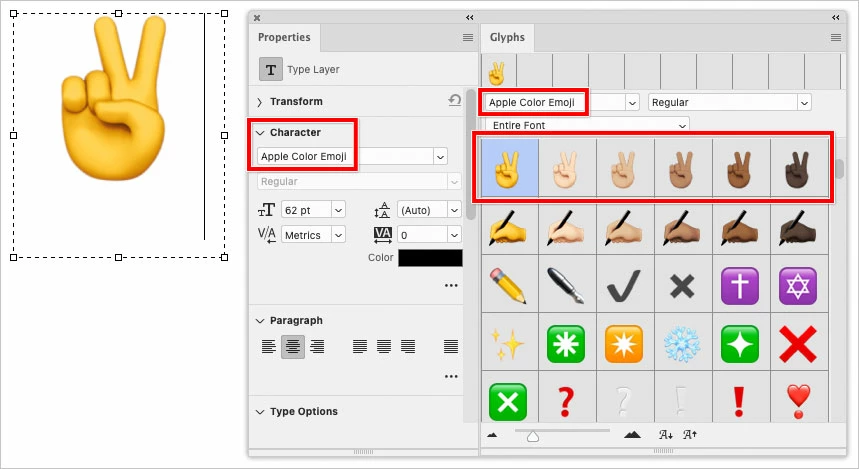
Recently, Adobe added emoji support to Photoshop. First set up a text layer with an active insertion point. Select an emoji font, then open the Glyphs panel, find the emoji you want and double-click it to add it to the text layer.


3 replies

Conrad_C
Community Expert
Conrad_CCommunity ExpertCorrect answer
Community Expert
July 10, 2022

Recently, Adobe added emoji support to Photoshop. First set up a text layer with an active insertion point. Select an emoji font, then open the Glyphs panel, find the emoji you want and double-click it to add it to the text layer.


Trevor.Dennis
Community Expert
Community Expert
March 23, 2025

Hey, I hadn't seen that.  Thanks.

jane-e
Community Expert
Community Expert
July 10, 2022

@Elinor25187353k9t9 


Type tool > Click insertion point > Open Character Viewer (macOS) > spotlight search in viewer for "peace" > double-click to add to insertion point > select character and change typesize.


Jane


c.pfaffenbichler
Community Expert
Community Expert
July 10, 2022

If that icon is part of a font you can use the Type Tool to add a Type Layer and insert it. 

If it’s a graphic you can place it as a Smart Object (at least if it is in some common format like ai, eps, pdf, png, …).