nmclamb
Known Participant
June 10, 2025
Question

I want to clean up my automated batch actions but can't find their save files

  • June 10, 2025
  • 1 reply
  • 248 views

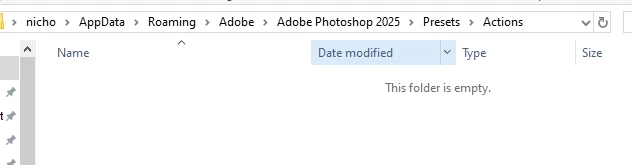
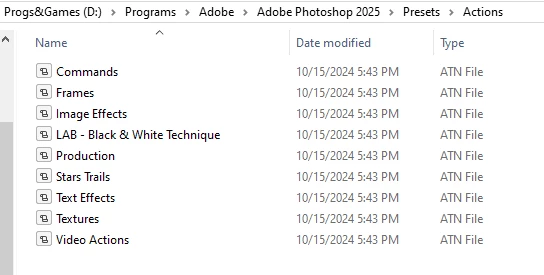
I looked in the Actions folder and there aren't any by the name of my actions. There should be several by the name of sky replacements


1 reply

Jeff Arola
Community Expert
Community Expert
June 21, 2025

They are in the Actions panel, but not in either location of your two screenshots?


Did you ever save the actions from within the Actions panel?


Click on the name of the Action Set and go to the Actions panel flyout menu and do Save Actions


or click on an individual action in the set to save just that action and do Save Action


Then take notice of the location the action or actions are being saved.

It should default to the Actions folder in

C:\Users\UserName\AppData\Roaming\Adobe\Adobe Photoshop 2025\Presets\Actions

which is where you to save or copy the actions to in order to see them listed in the Actions panel

flyout menu.


However, if you've saved actions to different location at one time or another, then it won't default to the above and you'll have to navigate to the above location.


jane-e
Community Expert
Community Expert
June 21, 2025

@nmclamb 


in addition to what Jeff said, are these actions that you created yourself or that you got from elsewhere?

  • if you created the actions, then they are not saved as an ATN file unless you follow Jeff's instructions to save them. Your screenshot shows that you found the correct location to display..
  • if you purchased the actions, they might reside anywhere on your HD, possibly even in your Downloads folder. They have an .atn extension.


Jane
