


kb59991576
Participating Frequently
Feb 4, 2026 6:33 AM UTC
Answered

I was trying to Upcale in Photoshop (Creative Cloud subscription) as LRC does not allow upscaling if the denoise option has been used, and there is no Generative Upscale option in the Image dropdown. What am I missing? All apps have been updated

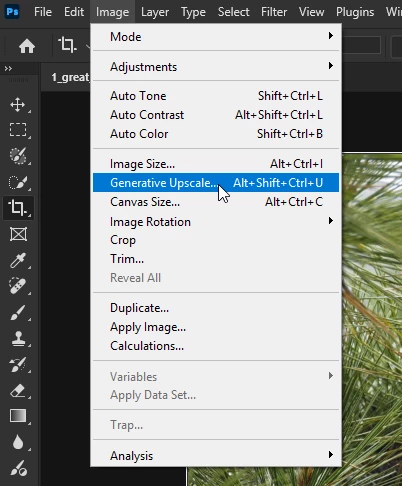
I was trying to Upcale in Photoshop (Creative Cloud subscription) as LRC does not allow upscaling if the denoise option has been used, and there is no Generative Upscale option in the Image dropdown. What am I missing? All apps have been updated

    Ged_Traynor
    Ged_TraynorCorrect answer
    Community Expert
    Feb 4, 2026 8:10 AM UTC

    ​@kb59991576 have you checked here


    13 replies

    Legend
    Feb 4, 2026 1:43 PM UTC

    Run Denoise on the RAW file, then export as a TIFF. Import that back into Lightroom and use Super Resolution. Make sure to do Denoise FIRST and not the other way around. I’ve been doing this with older Sony files (A100 and A700) and it works reasonably well. Watch closely for weird artifacting in hair especially though.

    Translate
    kb59991576
    Participating Frequently
    Feb 9, 2026 6:10 AM UTC

    Thanks, that should work

    Translate
    Stephen Marsh
    Community Expert
    Community Expert
    Feb 4, 2026 9:34 AM UTC

    Is it missing or grayed out? I have only tested with 8bpc data. Is the file a higher bit depth? I’m not in front of my computer to test.

    Translate
    Ged_Traynor
    Community Expert
    Community Expert
    Feb 4, 2026 9:42 AM UTC

    ​@Stephen Marsh the OP is using Photoshop version 26.11.2, as far as I’m aware, generative upscale was released in version 27.0

    Translate
    kb59991576
    Participating Frequently
    Feb 4, 2026 9:44 AM UTC

    Probably need to close PS and then open, creative cloud indicates that v 27.3.1 has been installed

    Translate
    Ged_Traynor
    Community Expert
    Ged_TraynorCommunity ExpertCorrect answer
    Community Expert
    Feb 4, 2026 8:10 AM UTC

    ​@kb59991576 have you checked here


    Translate
    kb59991576
    Participating Frequently
    Feb 4, 2026 8:34 AM UTC

    Yeah, I’m not getting the Generative upscale between the “image size” and ‘Canvas size”. That’s why i asked the question. I’m using a Mac, shouldn’t be any different! It’s a creative cloud plan, which should work.

    Translate
    Ged_Traynor
    Community Expert
    Community Expert
    Feb 4, 2026 9:03 AM UTC

    ​@kb59991576 check the keyboard shortcuts menu to make sure the visibility is enabled there


    Translate