


Inspiring
August 29, 2026
Answered

.icc profiles

  • August 29, 2026
  • 2 replies
  • 27 views

How do I remove ‘icc paper profiles from the drop down Menu, Print module in PS. I am using Mac.Tahoe.PS27.10.0. Tried everything, every path in all Libraries etc. Opened ColorSync in Utilities, traced the path, removed the relevant .icc profiles, restarted PS. The profiles still appear in PS
    Correct answer petercorbett321

    As I mentioned, I tried all of the above, no avail !! However via the ColorSync. utility I found that the profiles were located in HD/Lib/Printers/Epson/EMXprof

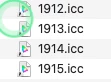
    They were not named by their usual prefixes i.e. “cifa_PFLustre_Epson etc… but were actually proxy files numbered - see image. I then identified these proxies and found the actual profile names, I then deleted the ones I did not want. They are now removed from PS. 

    More discovery !! these files are actually related to the Epson Print Layout programme and installed via the Epson Media Installer. Why PS shows them; go figure. Anyway issue resolved 


    2 replies

    Stephen Marsh
    Community Expert
    Community Expert
    August 29, 2026

    System wide (All Users):

    /Library/ColorSync/Profiles/


    User specific (Current User Only):


    ~/Library/ColorSync/Profiles/


    Adobe Common Folder:


    /Library/Application Support/Adobe/Color/Profiles/ 

    petercorbett321AuthorCorrect answer
    Inspiring
    August 29, 2026

    As I mentioned, I tried all of the above, no avail !! However via the ColorSync. utility I found that the profiles were located in HD/Lib/Printers/Epson/EMXprof

    They were not named by their usual prefixes i.e. “cifa_PFLustre_Epson etc… but were actually proxy files numbered - see image. I then identified these proxies and found the actual profile names, I then deleted the ones I did not want. They are now removed from PS. 

    More discovery !! these files are actually related to the Epson Print Layout programme and installed via the Epson Media Installer. Why PS shows them; go figure. Anyway issue resolved