



NB, colourmanagement
Community Expert
Community Expert
May 27, 2025
Resuelto

Image metadata / "Copyright Info URL" field uneditable

  • May 27, 2025
  • 3 respuestas
  • 2424 visualizaciones

Hi

I am having a hard time adding a creator URL to the "Copyright Info URL" field in Photoshop's image info panel 

see screenshot below

I can select the"Copyright Info URL" field, but I can neither paste into it nor type into the field directly 
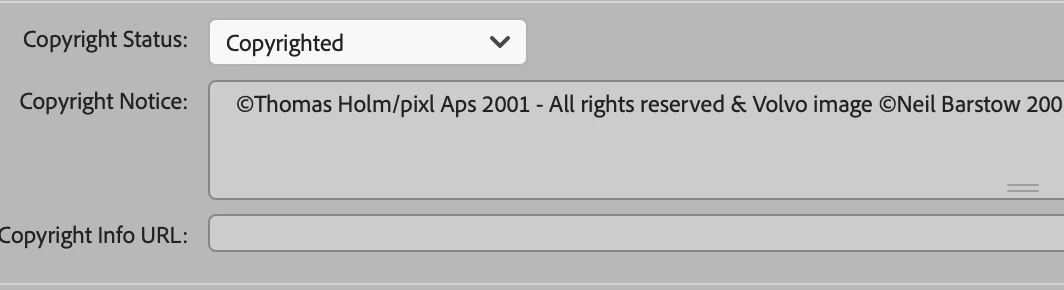
 

The field doesn’t seem to exist in Bridge it seems, so I can't edit there 


any help appreciated


many thanks 


neil barstow colourmanagement - adobe forum volunteer,



Mejor respuesta de davescm

Hi Neil,

You can turn on the ability to enter 'Copyright Info URL' in Bridge by going to Bridge > Preferences > Metadata and checking IPTC (IIM,Legacy)


I don't know why it is greyed in your example from Photoshop though.

Dave

3 respuestas

Legend
May 27, 2025

Reset your prefs, the default answer to 99% of issues. LOL

Running Ps v26.7 under Sequoia 15.5, I was able to paste the URL of this post into the Copyright Info URL field, then click the "goto" arrow (yellow oval) to navigate to the post.


Larry
NB, colourmanagement
Community Expert
Community Expert
May 27, 2025

@LAMY2017 Oh dear it's usually me telling users to go through the tedious process to throughly reset Photoshop preferences. Thanks for testing too 
I can select that field but not paste ot type into it in Photoshop 

I found a workaround in the meantime, @Stephen Marsh  script does it and @davescm advice on Bridge settings allows access too.

davescm
Community Expert
davescmCommunity ExpertRespuesta
Community Expert
May 27, 2025

Hi Neil,

You can turn on the ability to enter 'Copyright Info URL' in Bridge by going to Bridge > Preferences > Metadata and checking IPTC (IIM,Legacy)


I don't know why it is greyed in your example from Photoshop though.

Dave

NB, colourmanagement
Community Expert
Community Expert
May 27, 2025

@davescm thanks lots, that worked 


Neil B

Stephen Marsh
Community Expert
Community Expert
May 27, 2025

That's curious... Additionally, Bridge and Photoshop should be the same. As a workaround, you can try this script.


#target photoshop

// Create dialog window
var dlg = new Window('dialog', 'Set Copyright Info URL');
dlg.orientation = 'column';
dlg.alignChildren = 'fill';

// Group for label and edittext
var urlGroup = dlg.add('group');
urlGroup.orientation = 'row';
urlGroup.add('statictext', undefined, 'URL:');
var urlInput = urlGroup.add('edittext', undefined, '');
urlInput.characters = 30;

// OK and Cancel buttons
var btnGroup = dlg.add('group');
btnGroup.alignment = 'right';
var cancelBtn = btnGroup.add('button', undefined, 'Cancel');
var okBtn = btnGroup.add('button', undefined, 'OK');

okBtn.onClick = function () {
    var url = urlInput.text;
    dlg.close();
    set(url);
};

cancelBtn.onClick = function () {
    dlg.close();
};

dlg.center();
dlg.show();

function set(URL) {
    var s2t = function (s) {
        return app.stringIDToTypeID(s);
    };
    var descriptor = new ActionDescriptor();
    var descriptor2 = new ActionDescriptor();
    var reference = new ActionReference();
    reference.putProperty(s2t("property"), s2t("fileInfo"));
    reference.putEnumerated(s2t("document"), s2t("ordinal"), s2t("targetEnum"));
    descriptor.putReference(s2t("null"), reference);
    descriptor2.putString(s2t("URL"), URL);
    descriptor.putObject(s2t("to"), s2t("fileInfo"), descriptor2);
    executeAction(s2t("set"), descriptor, DialogModes.NO);
}


https://prepression.blogspot.com/2017/11/downloading-and-installing-adobe-scripts.html


NB, colourmanagement
Community Expert
Community Expert
May 27, 2025

@Stephen Marsh amazing of you, thanks that worked, I tried copy/pasting it into the AppleScript editor and compiling,

but got an error, then followed your useful guide and saved it as txt, changed the suffix and put it in Photoshop's scripts folder 


neil barstow colourmanagement - adobe forum volunteer,