
Image Processor Load XML: how to specify run multiple Actions on the same image?
I would like to run three Actions on all the images in my folder using the Image Processor screen. But the interface doesn't allow one to select more than one Action from the drop down menu near the bottom. Note: I cannot achieve what I want by performing all the image manipulation when creating the Action. That's for another post.
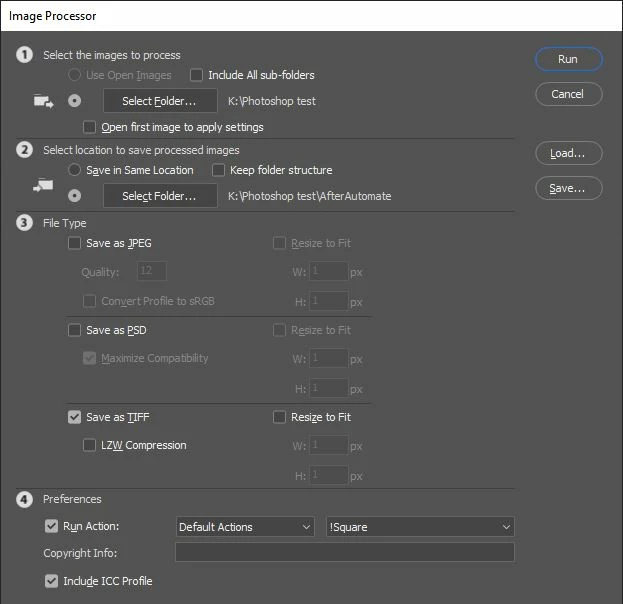
I then clicked Save to export this Image Processing script(?) as an XML file. I did this for all three of the Actions I want to combine. I then had three XLM files in a folder. Here is what one of them looks like when I open it in Notepad++.
<ImageProcessor>
<version>1</version>
<useopen>false</useopen>
<includesub>false</includesub>
<source>K:\Photoshop test</source>
<open>false</open>
<saveinsame>false</saveinsame>
<dest>K:\Photoshop test\AfterAutomate</dest>
<jpeg>false</jpeg>
<psd>false</psd>
<tiff>true</tiff>
<lzw>false</lzw>
<converticc>false</converticc>
<q>12</q>
<max>true</max>
<jpegresize>false</jpegresize>
<jpegw>1</jpegw>
<jpegh>1</jpegh>
<psdresize>false</psdresize>
<psdw>1</psdw>
<psdh>1</psdh>
<tiffresize>false</tiffresize>
<tiffw>1</tiffw>
<tiffh>1</tiffh>
<runaction>true</runaction>
<actionset>Default Actions</actionset>
<action>!Landscape</action>
<info/>
<icc>true</icc>
<keepstructure>false</keepstructure>
</ImageProcessor>
Then I copied the all code from each of the three XML files in a new XML into a new XML file. Then in Image Processor, I clicked Load, added the new XML file, and clicked Run. But it didn't perform the three separate Actions. It only performed the Action that was visible in the Image Processor screen (ie, !Square).
In one test, the <ImageProcessor></ImageProcessor> tags appeared three times. In another test, I only used these tags once.
Here is my question: how can one run more than one Action within Image Processor, whether using some XML programming trick or some other method?


 AdChoices