Participating Frequently
November 23, 2025
Answered

Image processor replaces characters in file names

  • November 23, 2025
  • 2 replies
  • 729 views

I'm using Image processor to batch convert eps files to psd in Photoshop 2026 Mac.

My files have an asterisk (*) in their names, but they get replaced by underscores (_) in the exported files.

Is there a way to prevent this (unwanted) substitution?

Correct answer Stephen Marsh
quote

Thank you @Stephen Marsh, that worked.

Any idea? 


By @philippeg6226457


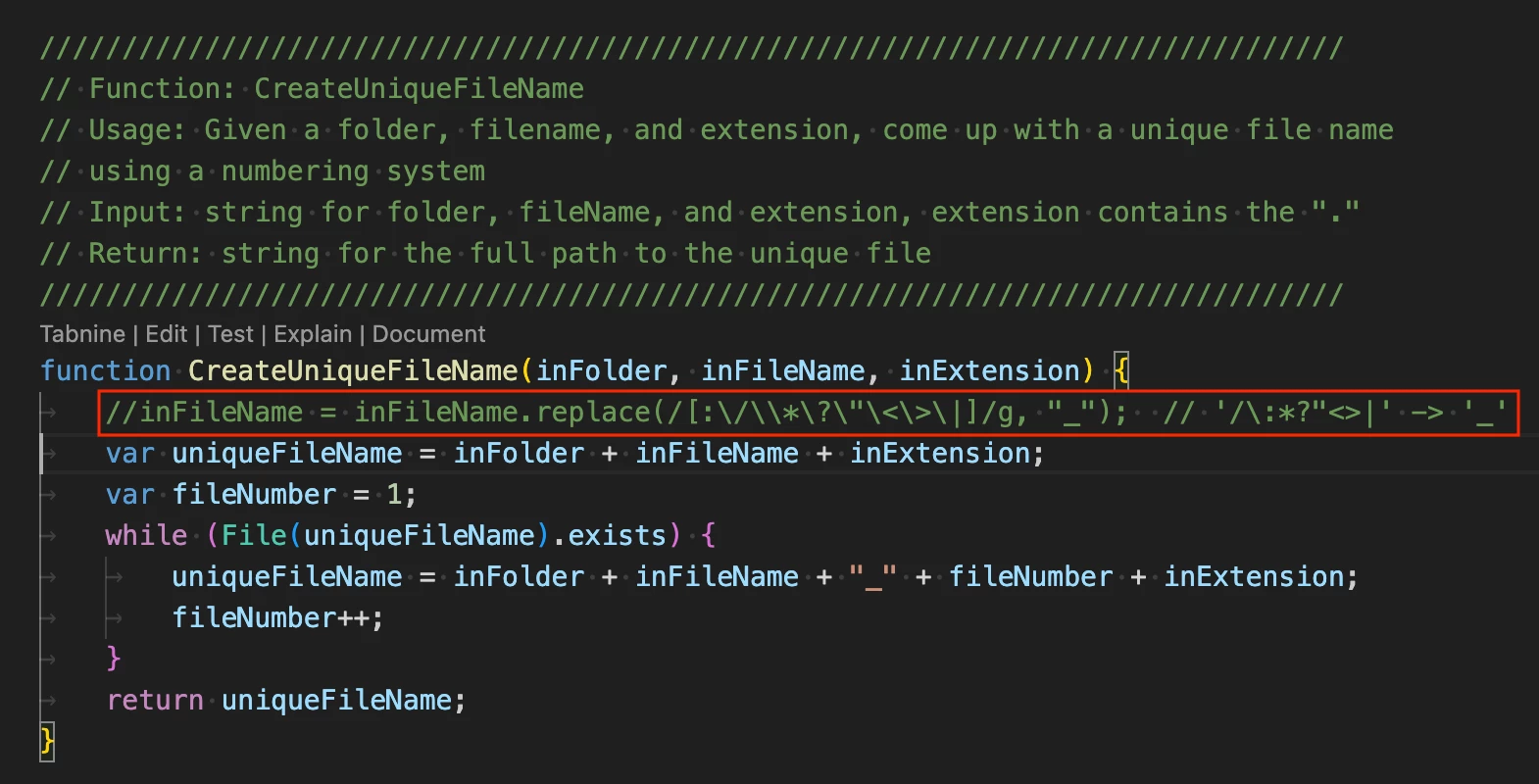
Simply comment out by adding 2 forward slashes or delete the entire filename find/replace regular expression as below:


The result:


2 replies

Stephen Marsh
Community Expert
Community Expert
November 23, 2025

@philippeg6226457 


Quit Photoshop. Edit the following file in the Photoshop app/program folder:


...\Presets\Scripts\Image Processor.jsx


You need to remove the \* characters as in the following screenshot:


Participating Frequently
November 24, 2025

Thank you @Stephen Marsh, that worked.

And thank you @J E L for your advices.

I still have another filename issue though: some of my filenames include a slash (/).

I know it is bad 🙂 but it works on Mac and we need them for this specific project.

Here's what I did:

• Original line 1871: 

inFileName = inFileName.replace(/[:\/\\*\?\"\<\>\|]/g, "_");  // '/\:*?"<>|' -> '_'

• Modified for asterisk (ok):

inFileName = inFileName.replace(/[:\/\\?\"\<\>\|]/g, "_");  // '/\:*?"<>|' -> '_'

(why these two escape backslashes?)

• Modified for slash (not ok):

inFileName = inFileName.replace(/[:\\?\"\<\>\|]/g, "_");  // '/\:*?"<>|' -> '_'

 • This doesn't work either:

inFileName = inFileName.replace(/[:\?\"\<\>\|]/g, "_");  // '/\:*?"<>|' -> '_'

Any idea? 

Legend
November 24, 2025

Forward slash is not legal in a Mac filename, that is the directory (folder) delimiter. "/Users/username/Desktop/foo.jpg"

With Extendscript, forward slash is treated as a backslash for cross-platform compatibility so the same script works on both Mac and Windows.

J E L
Community Expert
Community Expert
November 23, 2025

Hi @philippeg6226457, it's probably because it's running into non-standard characters in filenames with the Image Processor.jsx script used to process the files. You could write or search for a script that modifies the Image Processor script to handle special characters. Also, you might explore using Adobe Bridge before or after to batch rename files: select the EPS (or PSD) files, go to Tools > Batch Rename, and use “String Substitution” to replace * with - or remove it. Others here may have more ideas!