


Images downloaded from social media not opening
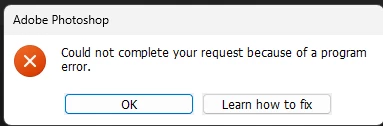
I recently updated to Photoshop 2026. I have been having this issue where jpgs downloaded from social media don't open and give this error.
A similar issue used to happen in Adobe Indesign where photos downloaded from whatsapp gave an error when imported in Indesign. Opening them in MS Paint and saving them again removed the error.
In photoshop, I get this error. After clicking on "learn how to fix", I am taken to this page.
https://helpx.adobe.com/photoshop/desktop/troubleshoot/file-format-issues/resolve-program-error-while-saving-files.html?trackingid=C12Y2WS7&mv=in-product&mv2=ps
I have taken all the steps given on the above page.
The images open fine in MS Paint. And if I save them in MS paint and open them in photoshop, they open fine.
But is there a better way that the jpgs open fine directly in photoshop?
Someone reported a similar issue here also in 2020.
https://community.adobe.com/t5/photoshop-ecosystem-discussions/my-whatsapp-images-is-not-in-photoshop/td-p/10859958
Here are the images.
 AdChoices