


Import video frames to layers option has disappeared?
I've recently got a new laptop (Windows 11) and downloaded Photoshop on the new one. Previously, I could go to File > Import > Video frames to layers, but that option isn't there anymore. I also can't drag a video clip into the window (it says 'Could not complete the command because no parser or file format can open the file') or open a video file. I've tried downloaded a few versions - the one that downloaded initially was 27.2.0, I tried 27.1.0 and went back to 26.0.0 because it was the oldest one they had and none of them worked. It definitely worked on my previous laptop, though I'm not sure specifically which version it was - definitely a 2025 one. These are the options I have under file. Has anyone experienced this and knows how to fix it?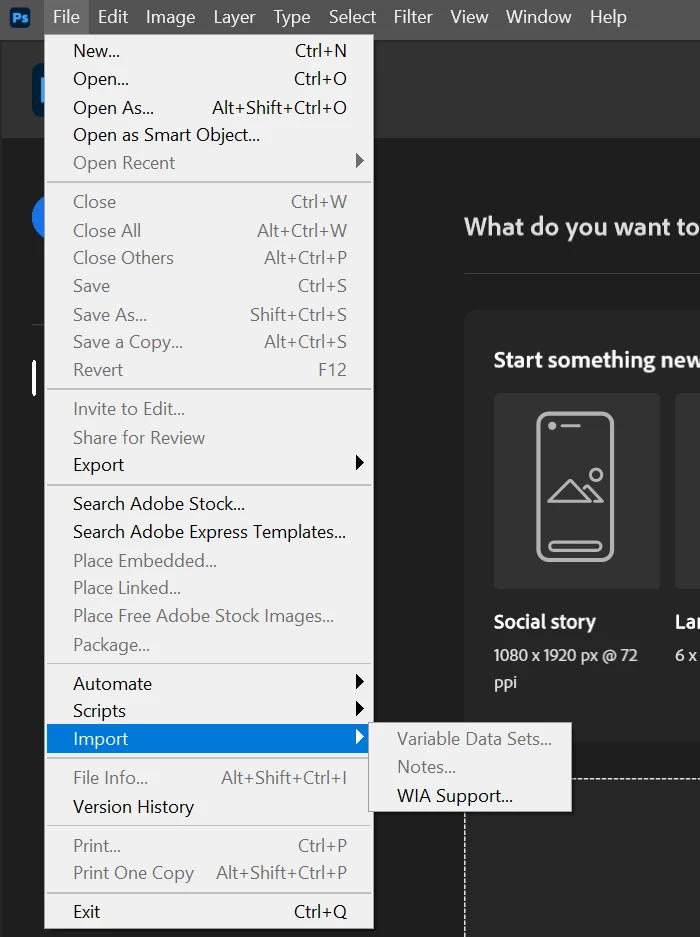

 AdChoices