Participant
May 29, 2023
Answered

Improved Gradients Not Exporting Properly

  • May 29, 2023
  • 24 replies
  • 21159 views

I'm running into an issue with the Improved Gradients when exporting a jpg through the export panel when using multiple gradients and artboards.
The preview and the exported image is not reflective of the gradient in the actual photoshop file.

Correct answer jane-e


@brettparton wrote:

Are there any suggested work arounds or a way to set the gradient into a legacy mode in the meantime?


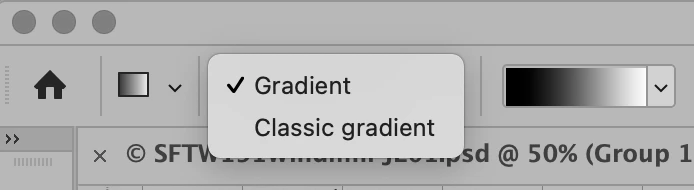
Yes, you can set the Gradient tool to legacy mode in the options bar. Select "Classic Gradient" instead of "Gradient".


Jane


24 replies

Adobe Employee
June 19, 2023

We're working to fix this issue. Thanks for your understanding

Known Participant
October 17, 2023

It has been like this for months now. Maybe leave aside all those unnecessary and unethical AI tool and go work on stuff that actually matter for professionals. 

December 27, 2023

Confirming this issue is still present in the latest build of Photoshop.

Participant
June 19, 2023

I'm having the same problem as well! The gradients look as they should on the Photoshop document, but when doing 'Export As' the artboard with the gradient on looks completely different to the way it should. Almost like the gradient has moved and become harsher. 

Participating Frequently
June 6, 2023

Same issue with the legacy "export as". Also, gradients move when duplicating OR creating another artboard...How come new features like that are not properly tested before publishing ?

Participant
June 6, 2023

Running into the same problem. Gradients are not exporting correctly when compared to the actual designs.

Participant
November 15, 2023

I have the same problem!
