



Jools808080
Known Participant
January 23, 2024
Question

Improved Gradients Not Exporting Properly

  • January 23, 2024
  • 22 replies
  • 2621 views

I'm running into an issue with the improved Gradients when exporting a jpg through the export panel when using multiple gradients and artboards.
The preview and the exported image is not reflective of the gradient in the actual photoshop file.

I haven't been able to pinpoint the problem yet, but it seems that the gradient handles align themselves with the edges of all artboards, rather than just the artboard they are placed on.
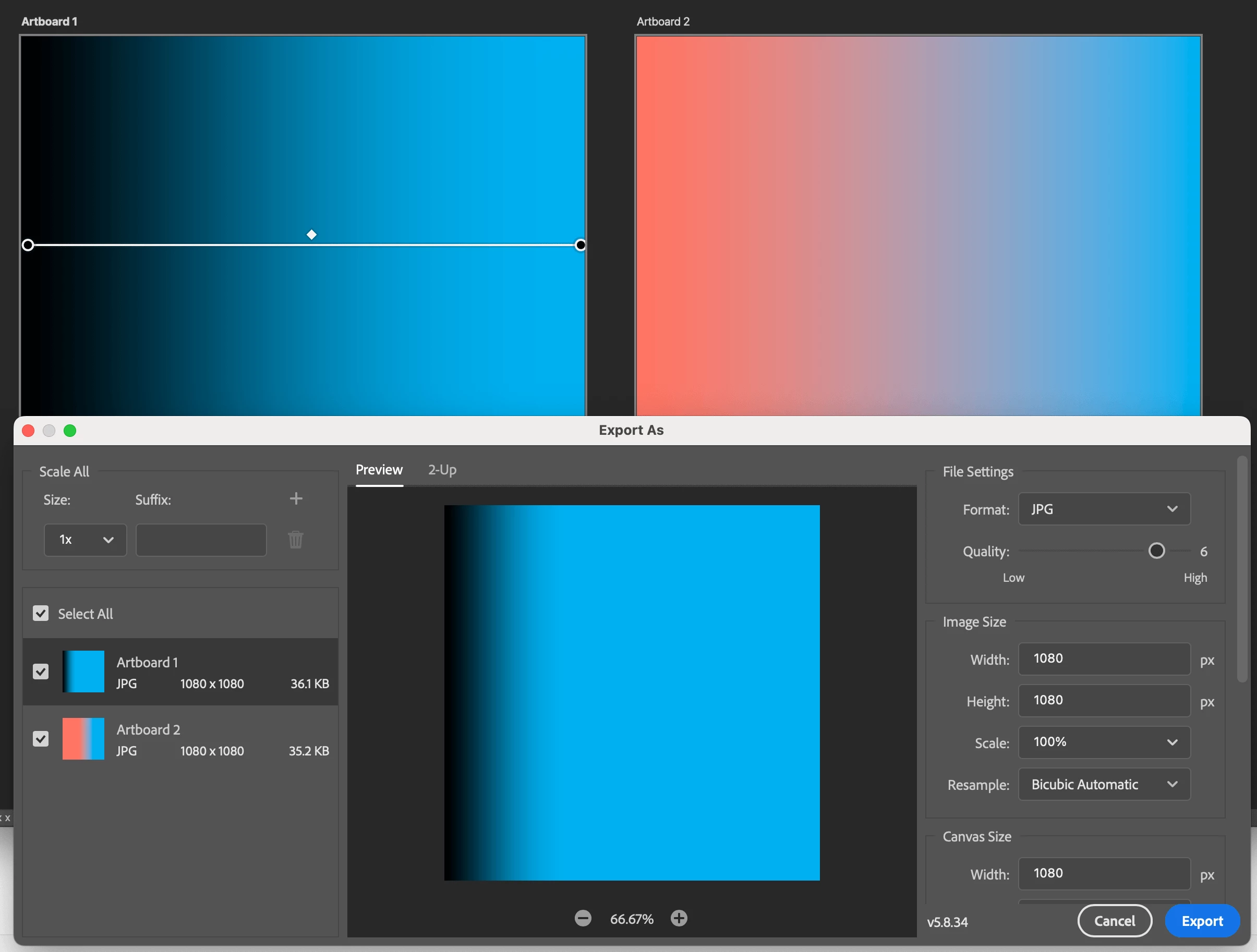


Since another bug report was marked as "solved" despite there not being a solution, I am opening this new report to keep the communication channels open.

Currently tested version: PS 25.3.1 as of Jan 23, 2024. This has been the case since the introduction of the improved Gradients in 2023.

Reproduction steps: At least 2 artboards, at least 1 improved gradient, export as jpg or PNG.

22 replies

Jools808080
Known Participant
May 30, 2025

I realise this should have been posted in Bugs, not in Discussions. If Adobe don't pick up on this I will replicate it in Bugs, since I don't see a way to move the existing thread. 

Participant
June 21, 2025

I just want you to know that you are doing the lord's work here haha. I found this thread from your original thread back in 2023(!!). It is now June 2025 - -and this problme is still persisting. Come on Adobe... you have a ton of money, please fix these issues.

Jools808080
Known Participant
June 23, 2025

thank you for your kind words 🙂 


i actually went back to my original crosslink and realised that I had, in fact, posted this to the bugs forum (as can be seen in the original URL). This thread must have been moved to the dicsusions forum by some misguided moderator. This somewhat dampens my hopes that the problem will ever be addressed properly by Adobe.  


...and yet, he persisted! 

Jools808080
Known Participant
May 29, 2025

I just received a notification email that the suggestion to rasterize the gradient layer was marked as the correct answer. I undid that, becasue that is a workaround, not a solution.


Let's aim higher than that.

Participating Frequently
May 29, 2025

Thank you. 

Participant
May 7, 2025

Also having this issue, will use classic gradients in the mean time.

- PS 26.5.0

- Macbook Pro, Sonoma 14.7.4

Participant
December 10, 2024

still an issue as of 26.1.0. it would be great to get a fix for this after years of users having to put up with it.

Jools808080
Known Participant
December 11, 2024

I just ran a few tests and the problem doesn't seem to occur for me anymore.

Could you give some reproduction steps so we can compare results?


I'm on PS 26.1.0 with an iMac running Sequoia 15.1.1

Jools808080
Known Participant
May 8, 2025

forgot to follow up on my own reply. the bug remains present.

Participant
September 11, 2024

Still an issue, PS 25.12.0. It's Septemer 2024.

Participant
May 7, 2024

I have the same issue, and they have a year trying to fix ti, better delete this feature.

Participant
May 7, 2024

Found on REDDIT...  File > Export > Save for Web to save a web-optimized PNG.

Participant
May 2, 2024

it's been a year and it is still not fixed...

Earth Oliver
Legend
April 25, 2024

Gradients and artboards have been bugged for at least 5 years now. Honestly, i don't think that Adobe is capable of fixing this issue, so your best bet is to find a workaround.

Jools808080
Known Participant
April 25, 2024

this particular bug relates to the improved gradients feature which was released in May of last year (2023).


Participant
April 25, 2024

A workaround for now is to duplicate the gradient layer, preserving the option for future adjustments, and merge it with a new layer. When exporting the image, use the merged layer and disable the one reserved for future edits. This effectively embeds the gradient, removing it as an effect on the layer.

Participant
June 21, 2025

Checking in here from June of 2025, and this is still the only workaround I've found for this problem. As the problem still persists 😞