


Inconsistent keyboard shortcut for "Type tool"
Hi,
I have the following issue with Photoshop 26.5.0: say the active tool is the "Move Tool" and the active layer is a text layer, and I want to modify the content of this text layer. Usually what I do is I press "T" on my keyboard and it makes the "Type Tool" active. Then I can modify the text layer the way I want. That's fine.
But unfortunately, this doesn't work for me anymore.
What happens now when I press "T" on my keyboard is:
_ the "Type Tool" becomes active
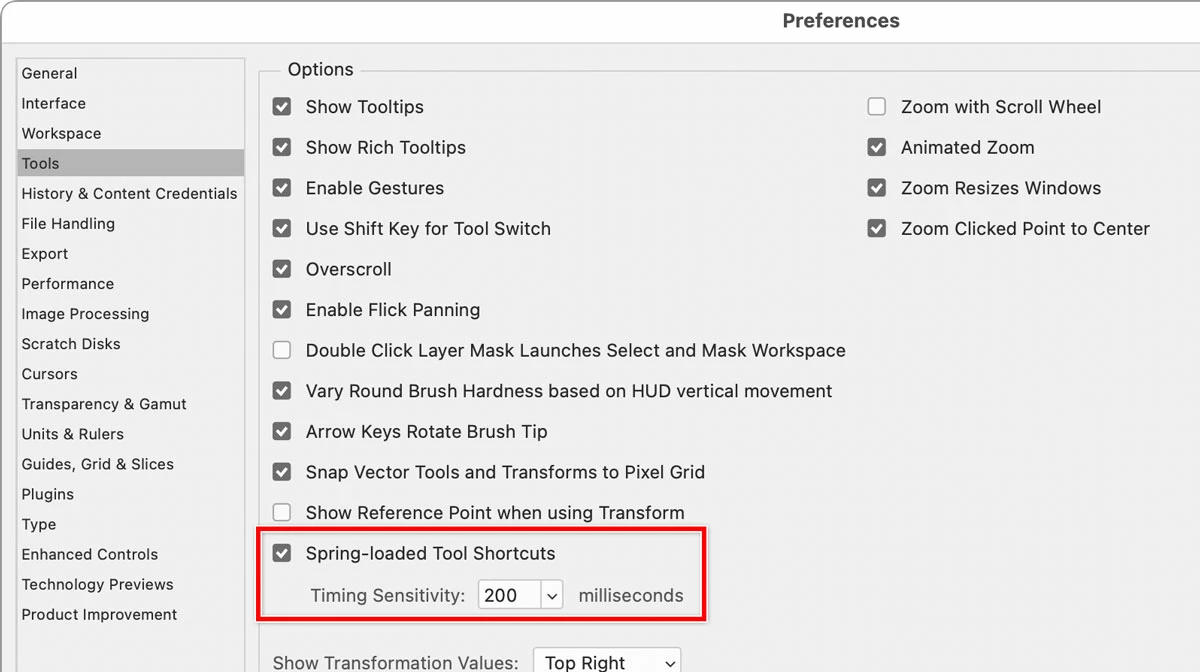
_ but as soon as I release the "T" key the active tool switches back to the "Move Tool"
_ If I change the active tool for something else, say the "Lasso Tool" for example, the same issue happens: I press "T" which makes the "Type Tool" active until I release the "T" key, and the active tool immediately switches back to the "Lasso Tool" again.
In other words, the shortcut fails.
Is anyone having the same issue?
How can I fix this?
Thanks a lot for your help, it's much appreciated,

 AdChoices