Known Participant
February 26, 2025
Question

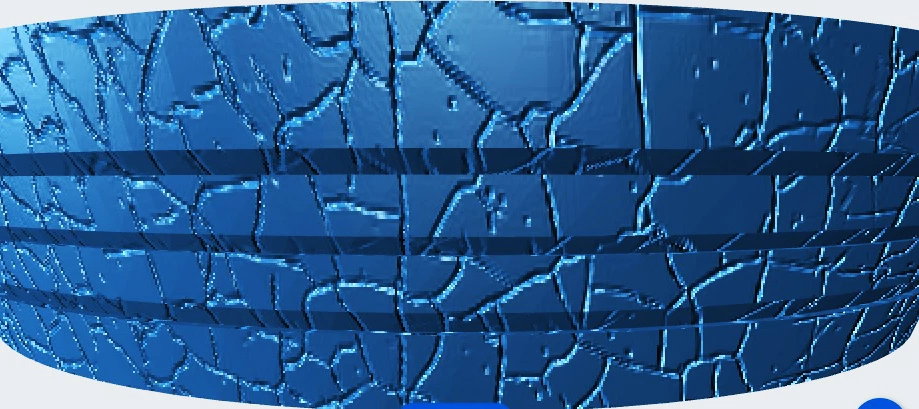
Inside out image?

  • February 26, 2025
  • 3 replies
  • 390 views

Is there any way to reverse this image in the radial direction, so that peaks are valleys and valleys are peaks? Essentially  z = 1 - z
 

3 replies

davescm
Community Expert
Community Expert
February 27, 2025

An alternative.

Add a duplicate layer.

Use Filter >Stylise>Emboss

Set that layer to Luminosity Blend mode

Add a curves adjustment layer clipped to that new layer and adjust, along with the opacity of the filtered layer, to get the desired effect.

Dave

Trevor.Dennis
Community Expert
Community Expert
February 27, 2025

It's like one of those optical illusions Dave.  You stare at the image, and randomly changes between peeks and trough depending on how your brain perceives the light direction.  A nice approach to a tricky problem though.

Semaphoric
Community Expert
Community Expert
February 28, 2025

My first idea was just turn it over, like the Cake Slice Illusion (one slice gone, or one slice left?):

 https://lapercepcion16.blogspot.com/2016/03/ilusiones-opticas.html 

Semaphoric
Community Expert
Community Expert
February 27, 2025

I'm not sure if this is what you're after, but I tried converting the image to Lab mode, inverting the Lightness channel, and converting back to RGB:


Trevor.Dennis
Community Expert
Community Expert
February 27, 2025

Woah there John.  We can't compete with alchemy and magic. 😉 

Trevor.Dennis
Community Expert
Community Expert
February 26, 2025

Is this a single layer raster image? I suspect that it is.
