


Alex_R84
Inspiring
August 17, 2026
Question

Interface Lag in Menus

  • August 17, 2026
  • 7 replies
  • 35 views

Hello,

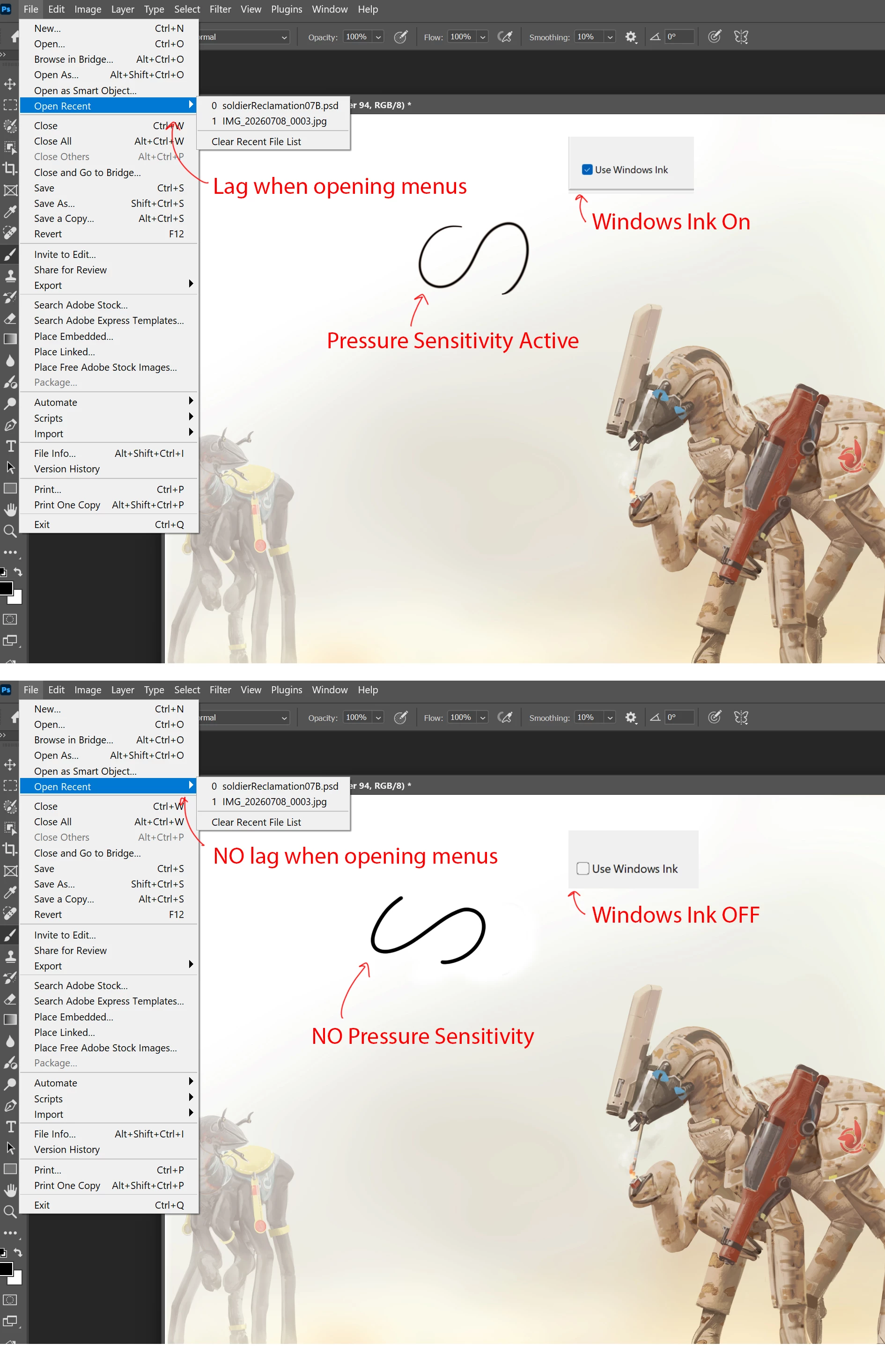
Recently I have noticed that when I select a menu, or a drop down menu, there is a brief freeze and lag.

This lag vanishes with Windows Ink is disabled, BUT, then I lose all pressure sensitivity.

The lag isnt there when I roll over menus, but is when they are clicked.

I am on Windows 11, using a Wacom Intuos Pro LRG (and older model: PTH-851)
 

    7 replies

    Alex_R84
    Alex_R84Author
    Inspiring
    August 20, 2026

    (deleted comment)

    Community Expert
    August 17, 2026

    To get the pressure sensitivity on deactivated Windows Ink back create a PSUserConfig.txt by following the steps below

    1. Close Photoshop
    2. Create txt file named: PSUserConfig.txt and type inside: UseSystemStylus 0 in the Photoshop settings folder (C:\Users\[Username]\AppData\Roaming\Adobe\Adobe Photoshop xxxx\Adobe Photoshop xxxx Settings)
      xxxx → depends on the installed Photoshop version (for the recent version it is 2026)
    3. Restart Photoshop. 


    My System: Intel i7-8700K - 64GB RAM - NVidia Geforce RTX 3060 - Windows 11 Pro 25H2 -- LR-Classic 15 - Photoshop 27 - Nik Collection 9 - PureRAW 6 - Topaz Photo AI
    Anshul_Saini
    Community Manager
    Community Manager
    August 17, 2026

    Hi ​@Alex_R84,


    Thanks for reporting this. AxelMatt's suggestion to set PSUserConfig.txt to UseSystemStylus 0 is a solid first step that should restore pressure sensitivity while bypassing Windows Ink.


    Additional steps to try (beyond the PSUserConfig approach):

    • Update your Wacom driver to 6.4.13-4 (released April 2026). You can get it from Wacom's driver page.

    • Set Windows Ink to off per-application in Wacom Center rather than globally. In Wacom Center, add Photoshop as a specific application profile and disable Windows Ink only for it.

    • Go to Settings > Bluetooth & devices > Pen & Windows Ink > Additional pen settings and disable "Display additional keys pressed when using my pen."


    Could you check if the Brushes panel or the Brush Settings panel is open/docked? There are some reports of both brush panels being visible while in WinTab mode, which increases the chance of a freeze occurring. Could you try closing/collapsing them and see if the menu lag decreases or stops?


    Let us know how it goes.


    Best,

    Anshul Saini


    Alex_R84
    Alex_R84Author
    Inspiring
    August 20, 2026

    Thank you, sadly the latest drivers are not compatible with the Intuos Pro PTH 851/K