Inspiring
Oct 20, 2026 3:48 PM UTC
Answered

Is it possible to turn off these constant prompts/suggestions to use AI?

Hi everyone, I'd like to know if it's possible to turn off these constant prompts/suggestions to use AI in all Creative Cloud software?
Adobe—like every other tool these days—is going overboard with this stuff. We're not all beginners who need to be spoon-fed. I'll decide for myself if and when to use them.




    justlearn
    justlearnCorrect answer
    Community Expert
    Oct 21, 2026 9:10 AM UTC

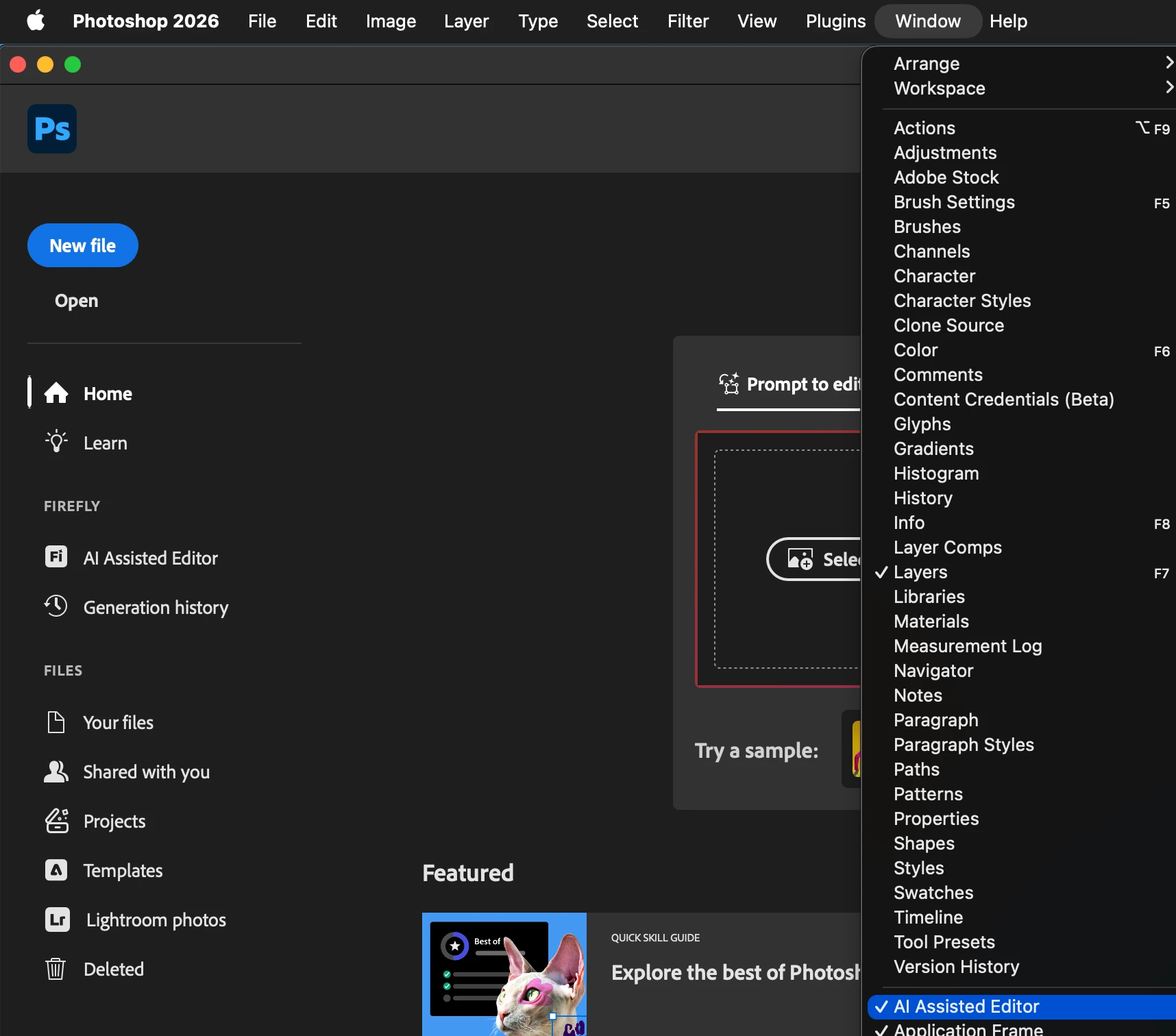
    ​@AntonioTheAnt I have turned off AI Assisted Editor under Window (I have it check on just to show you what your may look like) 


    m

    7 replies

    D Fosse
    Community Expert
    Community Expert
    Oct 21, 2026 9:47 AM UTC

    Holy smokes...so there was a way to remove that intrusive “AI assisted editor”-switch in the Options bar! Just turn it off in the Window menu, why didn’t I think to look there.

    Phew! I was a bit worried for a while.

    This is what I want to see:


    And the rest of it, the popups, should be covered by “Quiet mode”.

    Translate
    gener7
    Community Expert
    Community Expert
    Oct 21, 2026 5:06 PM UTC

    Same here. My AI editor was not there. I shut off features I won’t be using to save space and sometimes forget where I did.🤔

    Translate
    justlearn
    Community Expert
    justlearnCommunity ExpertCorrect answer
    Community Expert
    Oct 21, 2026 9:10 AM UTC

    ​@AntonioTheAnt I have turned off AI Assisted Editor under Window (I have it check on just to show you what your may look like) 


    Translate
    m
    gener7
    Community Expert
    Community Expert
    Oct 20, 2026 6:08 PM UTC

    Go into Photoshop Preferences > Notifications, checkmark Enable Quiet mode.


    If you are seeing this on your Home Screen, click on Hide Suggestions.


    Translate
    Jeff Arola
    Community Expert
    Community Expert
    Oct 20, 2026 5:39 PM UTC

    Is that is on the Photoshop Home Screen or in the Adobe Creative Cloud Desktop Application?

    Translate
    Inspiring
    Oct 20, 2026 4:45 PM UTC

    Yes, you can. In Photoshop go to Edit > Preferences and look for the Generative AI or AI section, then turn off the AI suggestions and prompts there. Each Creative Cloud app has its own settings, so check the preferences of the other apps too. That should clear most of it.

    Translate
    Legend
    Oct 20, 2026 5:13 PM UTC

    Nothing “generative” in Edit> anywhere. I do not see Edit>Preferences anywhere,

    Settings are in Photoshop>Settings which seems more likely, but nothing ‘generative,’ ‘Ai’, ‘suggestion’ or any combination/spelling when using the Search window in Ps 27.11.0 Preferences.

    Perhaps if the Photoshop>Settings>Interface>Show Ai Assisted Editor box is checked??

    Translate
    Larry