Participating Frequently
March 11, 2026
Answered

Is there a concise and accurate discription of how Blend If functions?

  • March 11, 2026
  • 4 replies
  • 130 views

Even the Adobe docs under: https://helpx.adobe.com/photoshop/using/layer-opacity-blending.html are not very good. AFAiCT Blend If does one thing and one thing only; it changes the Transparency of the pixels in the upper layer.    I tried Gemini AI and it returns a short and completely wrong answer. 
    Correct answer D Fosse

    @TimInSeattle 

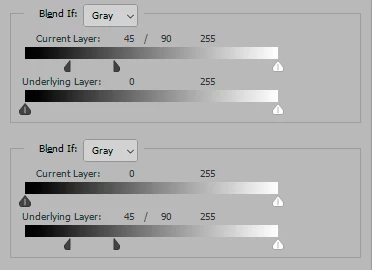
    On the face of it, it’s straightforward. Pixels in the current layer are rendered transparent, revealing the underlying layer, based on the values in either current or underlying layer.


    You can split the sliders with the Alt key for a tapering gradual onset:


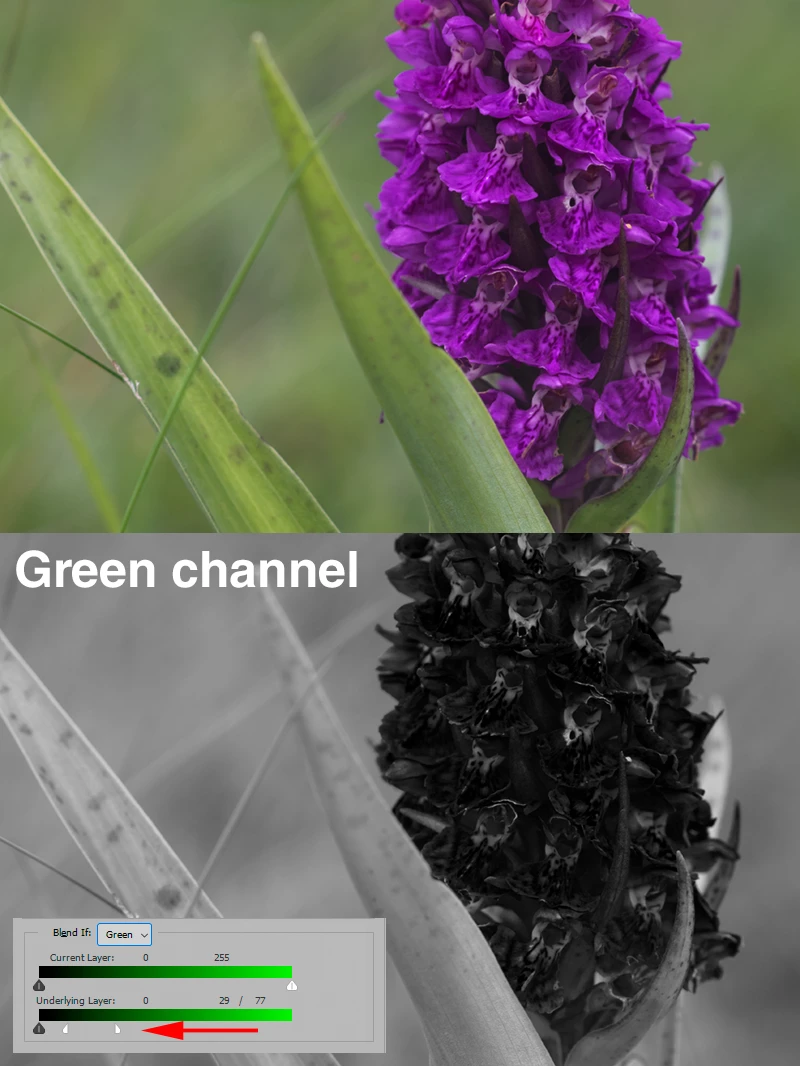
    So far it’s pretty basic. However, it gets really interesting and useful when you use Blend If per channel. Look at the green channel in this image, and how you can specifically target those purples with Blend If on, say, an adjustment layer:


    4 replies

    Stephen Marsh
    Community Expert
    Community Expert
    March 11, 2026
    Participating Frequently
    March 12, 2026

    thanx Stephen!  

       I think i understand it pretty well now.  Blend IF is only setting the transparency of the Current Layer based on tones in the upper and lower layers.   I get lost when i see descriptions like “All pixels with the luminosity value of 0 will be blended as transparent,”      What does that mean???     

      What does blended and unblended mean in PS parlance?  

    Cheers

    Tim

    PS - did you know that those two links point to the same article? 

    Stephen Marsh
    Community Expert
    Community Expert
    March 12, 2026

    Yes, I know that both links point to the same article. As I wrote that article around 25 years ago and the site no longer exists, it can be hard to find working links. If one link goes down, perhaps the other will work!

    Stephen Marsh
    Community Expert
    Community Expert
    March 11, 2026

    Blend If is one of those functions that may initially seem simple, however, it’s rather nuanced and much deeper than casual use might suggest.


    Many years ago I started a series of articles on my old personal website and only scratched the surface on 1 of 3 intended articles.

    Inspiring
    March 11, 2026

    Look on youtube, Photoshop Training Channel and PixImperfect had this covered pretty well.

    D Fosse
    Community Expert
    Community Expert
    March 11, 2026

    First of all, do not confuse Blend If and Blend Modes, those two are unrelated. The thread title says Blend If, but you have looked up Blend Modes. Yes, I can see it’s easy to think they’re the same thing.


    Blend if just sets pixels to transparent above or below a certain value or value range.


    Blend modes are more complex. They calculate a pixel’s RGB values based on the relationship between the RGB values of  the current layer, and the RGB values of the underlying layer. Each blend mode uses a different formula for this calculation.


    There is no transparency in a Blend Mode, just a numerical calculation and a resulting RGB value. A Blend Mode only exists as a relationship between layers, it does not exist in a single layer.

    Participating Frequently
    March 12, 2026

    The description of Blend IF is lower down on that page I linked. 


    Participating Frequently
    March 12, 2026

    If anyone can find a clear technical description of BLEND IF from Adobe, i would love to see it.