


Participant
July 23, 2026
Question

Is there a way to install default iOS PS brushes on PC?

  • July 23, 2026
  • 5 replies
  • 24 views

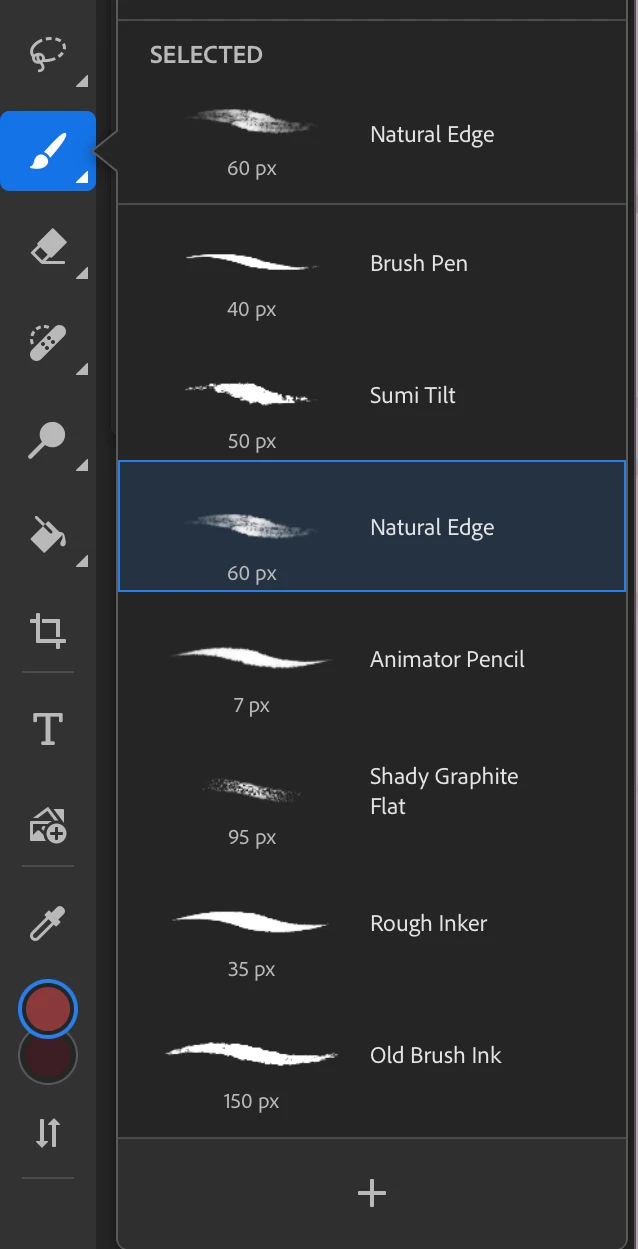
I would like to have some of the bushes that are automatically installed on PS for iOS also installed on my PC considering that I will sometimes work on a single illustration on both devices. Through my searching, it doesn’t seem as though I can export brushes from the iOS PS (why?) and I haven’t found a place to download them. So if someone knows a way to get these files in one way or another, that would be greatly appreciated.

For reference, here’s a screenshot of some of the brushes I’m talking about
 

    5 replies

    Trevor.Dennis
    Community Expert
    Community Expert
    July 24, 2026

    Hi ​@Sushibeth   You had me confused there for a bit wondering if the Mac version of Photoshop has its own unique brush presets, but Google assures me that they are same for Mac and Windows. So select the brush and right click inside the document window to open the brushes panel, and click on the little cog pop-out menu in the top right corner, and select

    Append Default Brushes 

    You can also click on Get more brushes to access hundreds more brush ptresets.

    SushibethAuthor
    Participant
    July 24, 2026

    Sorry if I wasn’t clear enough, but I intended to ask how to get the brushes that are default to the iPad version of the program, not mac.

    Legend
    July 24, 2026

    At adobe.com, search for Importing iOS Photoshop Brushes into Photoshop Desktop

    Larry
    Legend
    July 24, 2026
    Legend
    July 24, 2026

    Check out Importing iOS Photoshop Brushes into Photoshop Desktop

    https://www.adobe.com/home/search?query=import%20iOS%20PS%20brushes%20into%20Ps%20desktop


    Larry