
olivu1568674
Known Participant
June 11, 2018
質問

Is there any way to move the time indicator of timeline to first frame of the layer using Photoshop script?

  • June 11, 2018
  • 返信数 5.
  • 4862 ビュー

Currently, I am using following script to move time indicator between keyframes.

function next_key_frame() {

var d1 = new ActionDescriptor();

var d2 = new ActionDescriptor();

d2.putEnumerated( stringIDToTypeID( "trackID" ), stringIDToTypeID( "stdTrackID" ), stringIDToTypeID( "opacityTrack" ) );

d1.putObject( stringIDToTypeID( "trackID" ), stringIDToTypeID( "animationTrack" ), d2 );

executeAction( stringIDToTypeID( "nextKeyframe" ), d1, DialogModes.NO );

}

function prev_key_frame() {

    var d1 = new ActionDescriptor();

    var d2 = new ActionDescriptor();

    d2.putEnumerated( stringIDToTypeID( "trackID" ), stringIDToTypeID( "stdTrackID" ), stringIDToTypeID( "opacityTrack" ) );

    d1.putObject( stringIDToTypeID( "trackID" ), stringIDToTypeID( "animationTrack" ), d2 );

    executeAction( stringIDToTypeID( "previousKeyframe" ), d1, DialogModes.NO );

}

But Now, I want to move the time indicator from 0th frame to the first frame of the Layer 2 directly using Photoshop script. Is there any way to do this?

From:
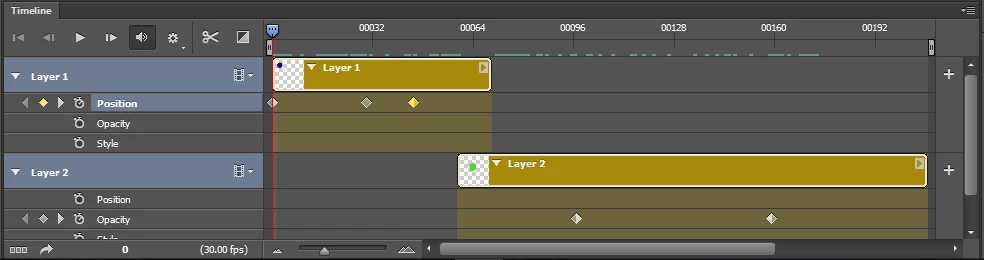
To:

このトピックへの返信は締め切られました。

返信数 5

Participant
June 14, 2022

Hi there I see the dropbox file is deleted... what I am looking for sounds to be similar... All I want to do is create an action that places the playhead at the beginning of the selected layer.
I haven't implemented scripts into a photoshop action before so any help would be great.

Many thanks,

Tom

Participating Frequently
November 7, 2018

Thanks r-bin​  for that excellent suggestion.    Unfortunately when dealing with longer videos,  moving through each frame to check for the enabled transforms is very slow.   it works!  but trying to come up with something faster. 

Any other suggestions on how to locate the start time position of a layer in the timeline panel?

I've been digging around in the descriptors and just can't find anything.

The only other option I can think of is to add an event watcher,  and track the position of the layer as moveInPoint, moveOutPoints and moveAllTime events happen... but that seems so overly complicated when I just need to extract that number that I know Photoshop knows already.  Reaching out to community for suggestions.

Legend
November 8, 2018

I know almost nothing about animation and I don’t use it.

But the proposed method can be significantly accelerated by doing so.

var r = new ActionReference();

r.putProperty(stringIDToTypeID("property"), stringIDToTypeID("frameCount")); 

r.putClass(stringIDToTypeID("timeline"));

var max_frame = executeActionGet(r).getInteger(stringIDToTypeID("frameCount"));

var step = max_frame/2;

var frame = Math.round(step);

var end_cnt = 0;


while (1) 

    { 

    goto_frame(frame); 

    step = Math.round(step/2);


    if (is_transform_enabled()) { if (step == 1) break; frame -= step; }

    else frame += step;

    if (step <= 1) ++end_cnt;

    if (end_cnt > 2) break;

    } 

function goto_frame(n) 

    { 

    try { 

        var d = new ActionDescriptor(); 

        var r = new ActionReference(); 

        r.putProperty(stringIDToTypeID("property"), stringIDToTypeID("time")); 

        r.putClass(stringIDToTypeID("timeline")); 

        d.putReference(stringIDToTypeID("null"), r); 

        var d1 = new ActionDescriptor(); 

        d1.putInteger(stringIDToTypeID("frame"), n); 

        d.putObject(stringIDToTypeID("to"), stringIDToTypeID("timecode"), d1); 

        executeAction(stringIDToTypeID("set"), d, DialogModes.NO); 

        } 

    catch (e) { throw(e); }  

    } 

function is_transform_enabled() // version for CS6

    { 

    try { activeDocument.activeLayer.resize(100); } catch(e) { return false; } 

    return true; 

    } 

But I do not guarantee that it does exactly what you want. :)

Participating Frequently
November 9, 2018

Thanks!  I'll give it a try!  

Legend
June 13, 2018

For your file there is a solution provided that the Layer2 animation ends no later than the animation of the other layers

Works even in CS6.

//if (get_curr_frame()) runMenuItem(stringIDToTypeID("timelineGoToFirstFrame")); // bad variant

goto_frame(0);

var x1 = get_frame_count();

runMenuItem(stringIDToTypeID("timelineMoveLayerInPoint"))

var x2 = get_frame_count();

executeAction(charIDToTypeID("undo"), undefined, DialogModes.NO);

goto_frame(x1-x2);

function get_curr_frame()

    {

    var r = new ActionReference();   

    r.putProperty(stringIDToTypeID("property"), stringIDToTypeID("currentFrame"));   

    r.putClass(stringIDToTypeID("timeline"));   

    return executeActionGet(r).getInteger(stringIDToTypeID("currentFrame")); 

    }

function get_frame_count()

    {

    var r = new ActionReference();   

    r.putProperty(stringIDToTypeID("property"), stringIDToTypeID("frameCount"));   

    r.putClass(stringIDToTypeID("timeline"));   

    return executeActionGet(r).getInteger(stringIDToTypeID("frameCount")); 

    }

function goto_frame(f)

    {

    var d = new ActionDescriptor(); 

    var r = new ActionReference(); 

    r.putProperty(stringIDToTypeID("property"), stringIDToTypeID("time")); 

    r.putClass(stringIDToTypeID("timeline")); 

    d.putReference(stringIDToTypeID("null"), r); 

    var d1 = new ActionDescriptor(); 

    d1.putInteger(stringIDToTypeID("frame"), f); 

    d.putObject(stringIDToTypeID("to"), stringIDToTypeID("timecode"), d1); 

    executeAction(stringIDToTypeID("set"), d, DialogModes.NO); 

    }

PS. In general, it is necessary to duplicate the document. Delete all layers in it except activeLayer. Run the script to get (x1-x2). And in the original document do positioning on the frame (x1-x2).

I have not found the best yet.

sidpalas
Inspiring
June 11, 2018

The following method will allow you to move the time indicator to a specific place, but I couldn't figure out how (via script or the GUI) to grab the timestamp of a particular key frame. If you know how to do that it should be easy to then use the method below for the purpose you described (I don't know if PS provides that functionality or not).

As r-bin mentioned, if you provided a sample .psd file it might help.

#target photoshop

setTimelineTime(2, 25, 30);

function setTimelineTime(seconds, frame, frameRate) {

    var timelineReference = new ActionReference();

    timelineReference.putProperty( s2t( "property" ), s2t( "time" ));

    timelineReference.putClass( s2t( "timeline" ));


    var timeDescriptor = new ActionDescriptor();

    timeDescriptor.putInteger( s2t( "seconds" ), seconds );

    timeDescriptor.putInteger( s2t( "frame" ), frame );

    timeDescriptor.putDouble( s2t( "frameRate" ), frameRate );


    var timelineDescriptor = new ActionDescriptor();

    timelineDescriptor.putReference( c2t( "null" ), timelineReference );

    timelineDescriptor.putObject( s2t( "to" ), s2t( "timecode" ), timeDescriptor );

    executeAction( s2t( "set" ), timelineDescriptor, DialogModes.NO );

    }

function c2t (c) {

    return app.charIDToTypeID(c);

    }

function s2t (s) {

    return app.stringIDToTypeID(s);

    }

Legend
June 11, 2018

I have never worked with animation or timeline. But if you provide a simplified file with layers and your animation, I can try to do what you need if it works and I will have time for it.

olivu1568674
olivu1568674作成者
Known Participant
June 12, 2018

scene.psd - Google Drive

r-bin this the animation file

Legend
June 12, 2018

OK. Not enough time to analyze. Here is a simplified script (only for CC2018 (2015.5 +)

Make the layer Layer2 activeLayer and run the script.

The script moves the frame from zero until the "Free Transform" command becomes available. This is the appearance time of the Layer2 layer

var d = new ActionDescriptor();

var r = new ActionReference();

r.putProperty(stringIDToTypeID("property"), stringIDToTypeID("time"));

r.putClass(stringIDToTypeID("timeline"));

d.putReference(stringIDToTypeID("null"), r);

var d1 = new ActionDescriptor();

d1.putInteger(stringIDToTypeID("seconds"), 0);

d1.putInteger(stringIDToTypeID("frame"), 0);

d1.putDouble(stringIDToTypeID("frameRate"), 30);

d.putObject(stringIDToTypeID("to"), stringIDToTypeID("timecode"), d1);

executeAction(stringIDToTypeID("set"), d, DialogModes.NO);

var cycle_cnt = 0;

while (cycle_cnt < 1000)

    {

    next_frame();

    if (is_transform_enabled()) break;

    ++cycle_cnt;

    }

function next_frame()

    {

    try {

        var d = new ActionDescriptor();

        d.putBoolean(stringIDToTypeID("toNextWholeSecond"), false);

        executeAction(stringIDToTypeID("nextFrame"), d, DialogModes.NO);

        }

    catch (e) { throw(e); }

    }

function is_transform_enabled()

    {

    var r = new ActionReference();       

    r.putEnumerated(charIDToTypeID("capp"), charIDToTypeID("Ordn"), charIDToTypeID("Trgt"));   


    var d = new ActionDescriptor(); 

    d.putReference( charIDToTypeID( "null" ), r );   

    d.putString (stringIDToTypeID("command"), "getCommandEnabled");   

    d.putDouble(stringIDToTypeID("commandID"), 2207 );   


    var ret = executeAction(stringIDToTypeID("uiInfo"), d, DialogModes.NO).getObjectValue(stringIDToTypeID("result")).getBoolean(stringIDToTypeID("enabled")); 

    return ret;

    }