

NexradJosh
Participant
November 14, 2023
Answered

Is there no way to adjust Canvas Size on Photoshop for Web?

  • November 14, 2023
  • 4 replies
  • 9506 views

I just started using Photoshop for the Web so I can avoid installing it on my smaller laptop, and there seems to be no way to adjust the Canvas Size of an image. The design is a lot different, so I may be missing something, but I've looked everywhere.


Is anyone else having this issue?
Correct answer Jeff Arola

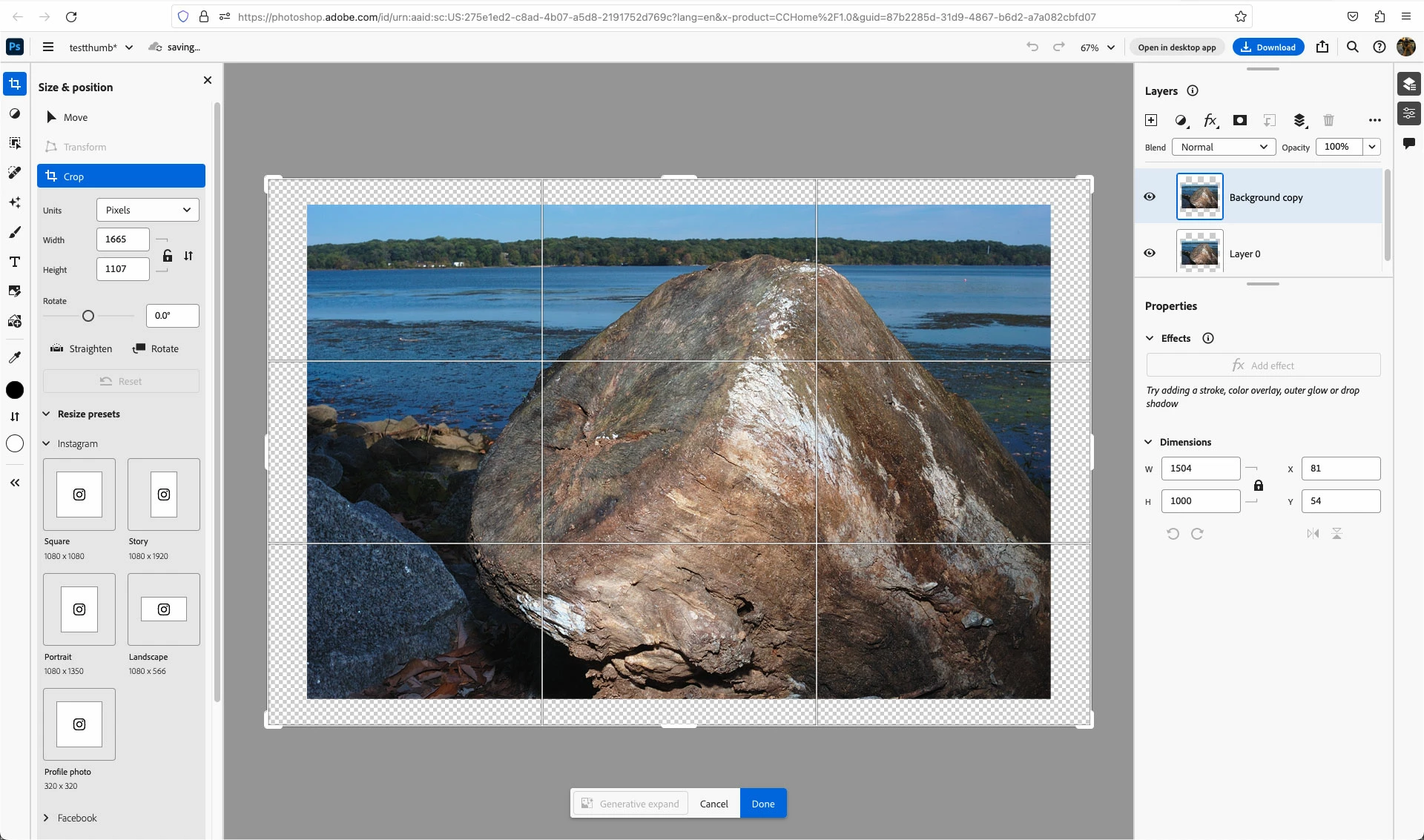
Looks like you can use the Crop Tool under Size & position to change the Canvas Size.

Just move the crop handles outside the image or enter values to increase the canvas size in the Width and Height fields.


I don't see a specific Canvas Size command like in Photoshop proper.


4 replies

Participant
July 23, 2024

This should have been a featured from the start, but apparently is not that important that Adobe hasn't updated the Web app in ages.. I work with Linux and sometimes I just need to update small images, I don't want to have to restart into Windows just to make small edits. 

Participant
April 10, 2024

I've been searching for the past hour. On top of everything else, just finding this page was a hassle. The ability to adjust canvas size with dimension input should be given. 

penguinstorm
Participant
January 17, 2024

Honestly, this is a fairly massive ommission and the workaround is ridiculously non-intuitive.

Participant
February 8, 2024

100% agree!

Participant
November 3, 2025
quote

100% agree! It's awful. I had directions for my students today done in the desktop app thinking that the web app would be about the same. Terrible mistake on the part of a teacher. 


By @Peter22079178s6hw


Jeff Arola
Community Expert
Jeff ArolaCommunity ExpertCorrect answer
Community Expert
November 28, 2023

Looks like you can use the Crop Tool under Size & position to change the Canvas Size.

Just move the crop handles outside the image or enter values to increase the canvas size in the Width and Height fields.


I don't see a specific Canvas Size command like in Photoshop proper.