
Participant
June 17, 2021
Question

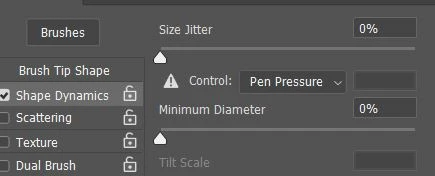
It shows a warning sign next to pen pressure , and its not working
  • June 17, 2021
  • 1 reply
  • 4248 views

The pressure isn't working. I am using VEIKK A30 , everything is up to date and I tried taking the nib in an out too. The pressure itself is working as the aplication for the tablet shows it. 

This topic has been closed for replies.

1 reply

JJMack
Community Expert
Community Expert
June 17, 2021

If you have not used your pen with Photoshop you will get that warning till you use your pen if your software is configured to work together.  On Windows  CC has support for two Pen Interfaces WinTab and Microsoft's INK.  you can use one or the the other. However,  all software need to be configured so Photoshop will work well with your pen. 


Windows 10, Photoshop 22.4.2 an your Pen device diver must be configured  to work well. IMO WinTab support performance is better than Windows INK. My Pen device is a Wacom device.  Here is how I configure Windows, Photoshop and Wacom for either WinTab or INK.  I know nothing about  your VEIKK A30  device. Does it support both interfaces? 


JJMack
Pınar06Author
Participant
August 31, 2021

hey ! Sorry for late reply , It turns out I didn't have the ''enable windows ink function'' on , I have it now and it work 🙂 Thanks for the asnwer.