
Participant
July 9, 2022
Question

[Javascript in Photoshop] Q: How to get W and H when using transfom?

  • July 9, 2022
  • 1 reply
  • 369 views

Hello.

I have been thinking of how to get width and height (%) when using free transform. I'm very new to Photoshop Javascript so I have been trying searching for [Free Transform in Javascript Photoshop] but there's no answer. 

I found one answer but it was just bounds (x,y,w,h) in px.

https://community.adobe.com/t5/photoshop-ecosystem-discussions/get-x-y-position-and-width-height-of-the-transform-box-of-a-layer-not-chopped-off-bounds/td-p/9826173


How can you get width and height (%) when using free transform in Photoshop Javascript?
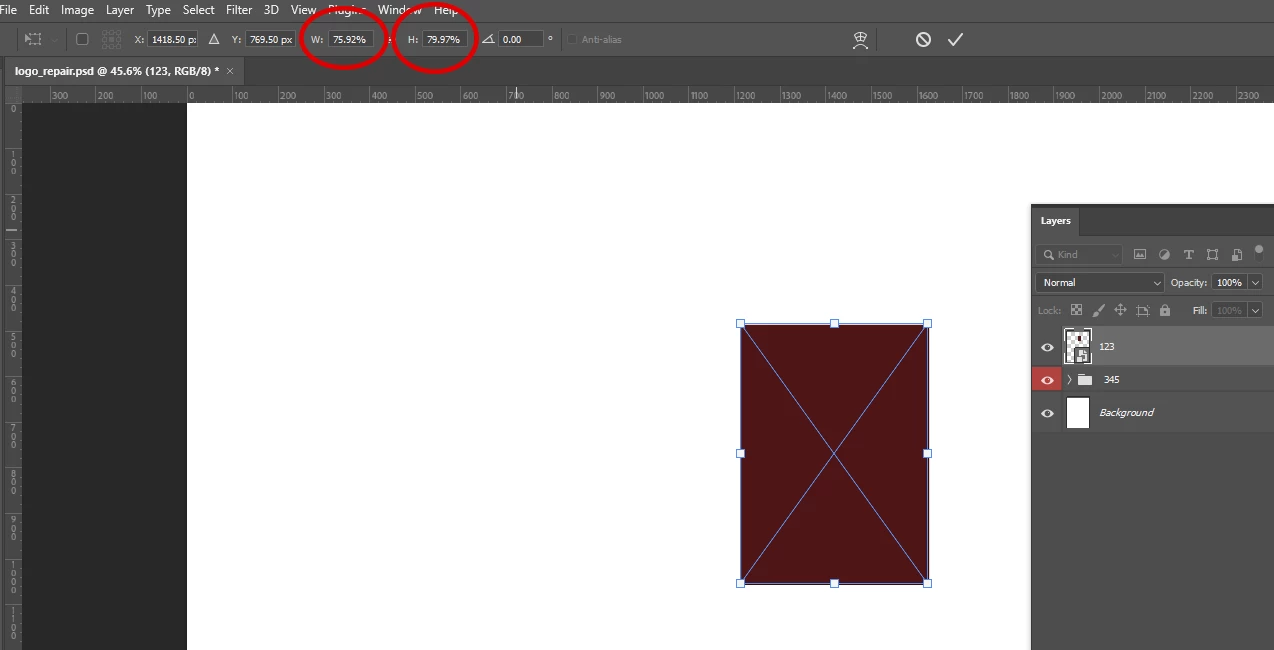
Thanks for your time. 

Best regards.

This topic has been closed for replies.

1 reply

Stephen Marsh
Community Expert
Community Expert
July 9, 2022

What are you trying to do?


Smart Objects complicate things for scripters. This may be possible with AM code, however, that is beyond my knowledge.

Participant
July 10, 2022

Hello Stephen, thanks for your reply.

There's a problem when using move tool, which cause the width and height of smart object become different. Which I want to fix (% of width and height must be equal)

I was trying to get the % width and height of the smart object when using free transform, using alert(). So this is my thinking, base on the previous forum link.

I am very new to Javascript, so I don't know how to use d.getDouble(stringIDToTypeID("width"))) didn't work. I hope this answers your question, best regards and have a nice day.

function get_layer_width(layer)
{

        if (layer.kind == LayerKind.SMARTOBJECT)

            {

            var layer0 = activeDocument.activeLayer;

            activeDocument.activeLayer = layer;

            var r = new ActionReference();

            r.putEnumerated( charIDToTypeID( "Lyr " ), charIDToTypeID( "Ordn" ), charIDToTypeID( "Trgt" ) );

            var d = executeActionGet(r).getObjectValue(stringIDToTypeID("smartObjectMore")).getList(stringIDToTypeID("transform")); //active free transform action
     
		
	var tmp = d.getDouble(stringIDToTypeID("width")));  //get width
 
	alert(tmp);
}
var docRef = app.activeDocument;
get_layer_width(docRef.layers[0]); //layer[0] must be smart object