
Participant
September 28, 2023
Question

K Value Filtering

  • September 28, 2023
  • 3 replies
  • 313 views

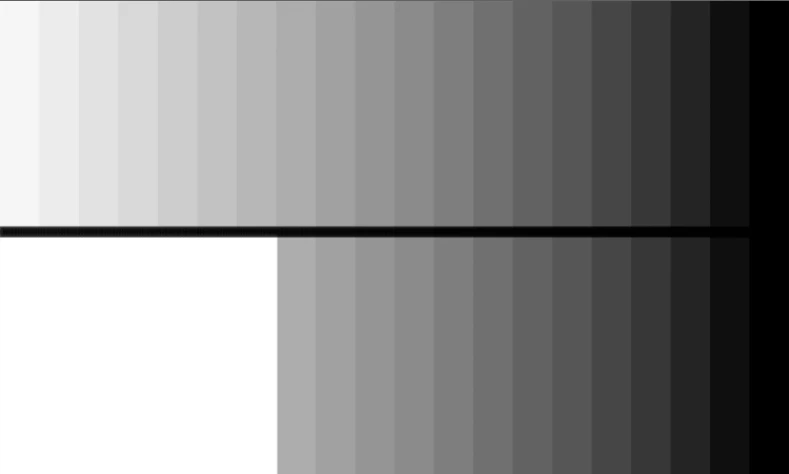
Hi All. This is for a grayscale file. I'm looking to apply a filter or series of filters that makes all tone less than 40% K present as white and leave any tone higher than 40% K untouched. I've manually created what this would look like in the attached image. The top shows the full tonal range in increments of 5% K. The bottom shows the resulting image if the filter was applied. Anythought or help is greatly appreciated!
This topic has been closed for replies.

3 replies

Stephen Marsh
Community Expert
Community Expert
September 28, 2023

@lindsayr15515315 


Use oldschool Arbitrary Map (ArbMap) pencil curves!


Conrad_C
Community Expert
Community Expert
September 29, 2023

Wow…I’ve long wondered what a practical application of the pencil mode might be! And there it is.

Stephen Marsh
Community Expert
Community Expert
September 29, 2023
quote

Wow…I’ve long wondered what a practical application of the pencil mode might be! And there it is.


By @Conrad_C


It's useful in flexographic print production (i.e. flexible food packaging) where it can either be used to cut-off/clip all tonal values under a target value, or set all tonal values under a target value to a minimum dot %.

D Fosse
Community Expert
Community Expert
September 28, 2023

I'd go with Dave's solution - but just so it's said for reference: Grayscale is a can of worms, and the reason is Photoshop's default working gray, Dot Gain 15%. That's the one you get in Image Mode > Grayscale. The Dot Gain profiles are generic profiles for offset print, but really outdated and not used anymore.


The problem is the tone response curve. It's nowhere near the tone response curve of any standard RGB profile.


That means you get very different numerical values from what you would expect in a standard conversion. Inversely, you get very different tonal values from the same numbers.


If you were to do what you propose, you need to change working gray to the equivalent grayscale profile to your RGB profiles (and also make sure that's the embedded profile). That's the only way to get consistent and predictable results:

  • sRGB > sGray
  • Adobe RGB > Gray Gamma 2.2
  • ProPhoto > Gray Gamma 1.8
  • Image P3 > sGray
davescm
Community Expert
Community Expert
September 28, 2023

A threshold adjustment layer set to blending mode 'screen' will do that


Dave