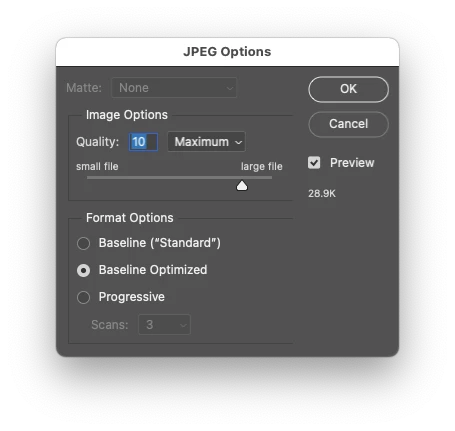
This version defaults the standard interface to use optimized and quality 10, providing flexibility to change values on the fly as needed (the previous script did not offer the ability to change quality or other values).
/*
Default JPEG Save to Optimized Standard.jsx
Based on:
https://community.adobe.com/t5/photoshop-ecosystem-discussions/save-as-jpeg-again/td-p/12650865
Stephen Marsh, 17th February 2022 - v1.0
Info: Uses the standard Photoshop interface with preset JPEG options, optimized & quality 10
*/

#target photoshop

if (app.documents.length > 0) {
    var docName = app.activeDocument.name.replace(/\.[^\.]+$/, '');
    try {
        // Use the previously saved path
        var docPath = app.activeDocument.path;
    } catch (e) {
        // If unsaved, select the desktop
        var docPath = "~/Desktop";
    }
    saveJPEG(10);
} else {
    alert("You must have a document open!");
}

function saveJPEG(compValue) {
	var s2t = function (s) {
		return app.stringIDToTypeID(s);
	};
	var AD = new ActionDescriptor();
	var AD = new ActionDescriptor();
	AD.putInteger( s2t( "extendedQuality" ), compValue );
	AD.putBoolean( s2t( "optimized" ), true ); // true for optimized / false for standard
	AD.putEnumerated( s2t( "matteColor" ), s2t( "matteColor" ), s2t( "none" ));
	AD.putObject( s2t( "as" ), s2t( "JPEG" ), AD );
	AD.putPath( s2t( "in" ), new File(docPath + "/" + docName + ".jpg"));
	AD.putInteger( s2t( "documentID" ), 320 );
	AD.putBoolean( s2t( "copy" ), true ); // true for copy
	AD.putBoolean( s2t( "lowerCase" ), true );
	AD.putEnumerated( s2t( "saveStage" ), s2t( "saveStageType" ), s2t( "saveSucceeded" ));
	executeAction( s2t( "save" ), AD, DialogModes.ALL );
}




 AdChoices