


Participating Frequently
June 14, 2019
Answered

Layer Mask Timeline Animation - not possible?

  • June 14, 2019
  • 5 replies
  • 15288 views

I've been trying to animate the mask of a layer in Photoshop to create a slightly more interesting reveal of text, as per dozens of tutorials (not least Adobe's own), but no matter what I do, the keyframing doesn't work - is this now not a feature of Photoshop animation?

When I add a keyframe & move the mask, the position is the same across the timeline, instead of changing over time -the keyframe indicator for the first frame changes to the half-filled marker, instead of staying open.
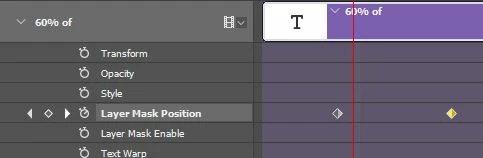
Any reason why I might be getting this really annoying behaviour?

Correct answer Tonny B Good

I had exactly the same problem and it was driving me insane!

SOLUTION: while moving raster mask DON'T use Ctrl-T (transform), just use V key and move. It seems, PS is interpering it differently. This solved the issue for me! 


For developers: please correct the issue! (my ver. 20.0.6)

5 replies

Participant
June 11, 2024

This tutorial helped me solve this issue: https://www.youtube.com/watch?v=Eu5Oz6xItq0

Use the move tool to move the layer mask


Tonny B GoodCorrect answer
Participant
April 15, 2020

I had exactly the same problem and it was driving me insane!

SOLUTION: while moving raster mask DON'T use Ctrl-T (transform), just use V key and move. It seems, PS is interpering it differently. This solved the issue for me! 


For developers: please correct the issue! (my ver. 20.0.6)

PECourtejoie
Community Expert
Community Expert
April 15, 2020

Hello, Tony, the developpers only fix the current version, 21.X.X did you try with that version to reproduce your issue?

Participant
November 26, 2019

Hey everyone, i've been having the same trouble and it's very annoying. Vector masks don't work eiter. Do you have any idea why? I'm guessing it's a bug, maybe? because it should work even with a text layer and a pixel mask.

I'm using Mac and Photoshop 2020

Thank you!

JJMack
Community Expert
Community Expert
June 14, 2019

What OS and PS version are you using.  Here is what I see usinf Windows  10 CC 2019

JJMack
AA9ArowAuthor
Participating Frequently
June 14, 2019

I'm using Win 10 with latest version of Photoshop 20.0.4 and I'd LOVE to be getting that result, but it's just not happening.

Omar.Fathy​ - Thanks for checking, yes - I'm definitely selecting the mask. The mask moves where I want it to, but it doesn't animate between frames, no matter what I do it stays in the last position I moved it to across all frames.

Thanks,

Amir

Omar.Fathy
Community Expert
Community Expert
June 14, 2019

Can you provide a screenshot for the layer panel ?

Omar.Fathy
Community Expert
Community Expert
June 14, 2019

Are you sure that you broke the link between the layer and the layer mask ?

AA9ArowAuthor
Participating Frequently
June 14, 2019

Yep. The mask isn't animating, the layer is staying where it's supposed to be

Omar.Fathy
Community Expert
Community Expert
June 14, 2019

You are sure also that you are selecting the mask not the layer when you change the position ?