


Question
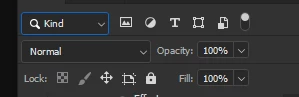
Layer mode wont stay selected
New version of PS wont keep the layer mode drop down selected when i click it, I used to be able to cycle through the modes using the up down arrows, now i have to click each one and release to see it. The Opacity, Fill and Kind? stay selected so whats up?
Adobe Photoshop Version: 27.0.0 20251015.r.25 d1c1320 x64 (final, Release)
Operating System: Windows 11 64-bit
Version: 11 or greater 10.0.22631.6199
System architecture: Intel CPU Family:6, Model:14, Stepping:13, AVX2, HyperThreading
Physical processor count: 8
Logical processor count: 16
Processor speed: 2304 MHz
Built-in memory: 32644 MB
Free memory: 20925 MB
Memory available to Photoshop: 25091 MB
Memory used by Photoshop: 70 %
 AdChoices